MC_CamIn (FB)
FUNCTION_BLOCK MC_CamIn
Electronic Camming
The slave axis follows the movement of the master axis as defined by the given cam table.
This function block controls the Slave axis. The Master axis
can be an axis controlled by another function block, or an encoder axis.
Calculation of slave positions
The positions for the Slave axis are calculated as follows:
Read the current position from the
Masteraxis.Scale and offset the master axis position to obtain the master cam position:
MasterCamPosition = MasterScaling * MasterAxisPosition + MasterOffsetEvaluate the cam table at the master cam position to obtain the slave cam position:
SlaveCamPosition = cam(MasterCamPosition)Scale and offset the slave cam position to obtain the slave axis position:
SlaveAxisPosition = SlaveScaling * SlaveCamPosition + SlaveOffsetWrite the calculated slave axis position to the
Slaveaxis.
Start Modes
Camming can be started in two different modes: immediate start and ramping in. With immediate start, the slave immediately follows the cam; with ramping in, a ramp-in phase is performed to bring the slave in sync with the cam.
Please note that the ramping-in start modes only have an effect on a
rising edge of input Execute. If the cam table is changed by modifying
input CamTableID, no ramping-in is performed.
Immediate Modes (absolute, relative)
With the start modes absolute and relative,
the slave is InSync immediately and follows the
cam table and master axis. Depending on the current state of the slave,
this can lead to a jump in position, velocity, and/or acceleration.
If the StartMode is absolute, the value of
SlaveAbsolute, set by MC_CamTableSelect, determines whether the
start mode is abolute or relative.
If the StartMode is relative, relative coordinates will
be used for the slave position, effectively overwriting the value of
MC_CamTableSelect.``SlaveAbsolute``.
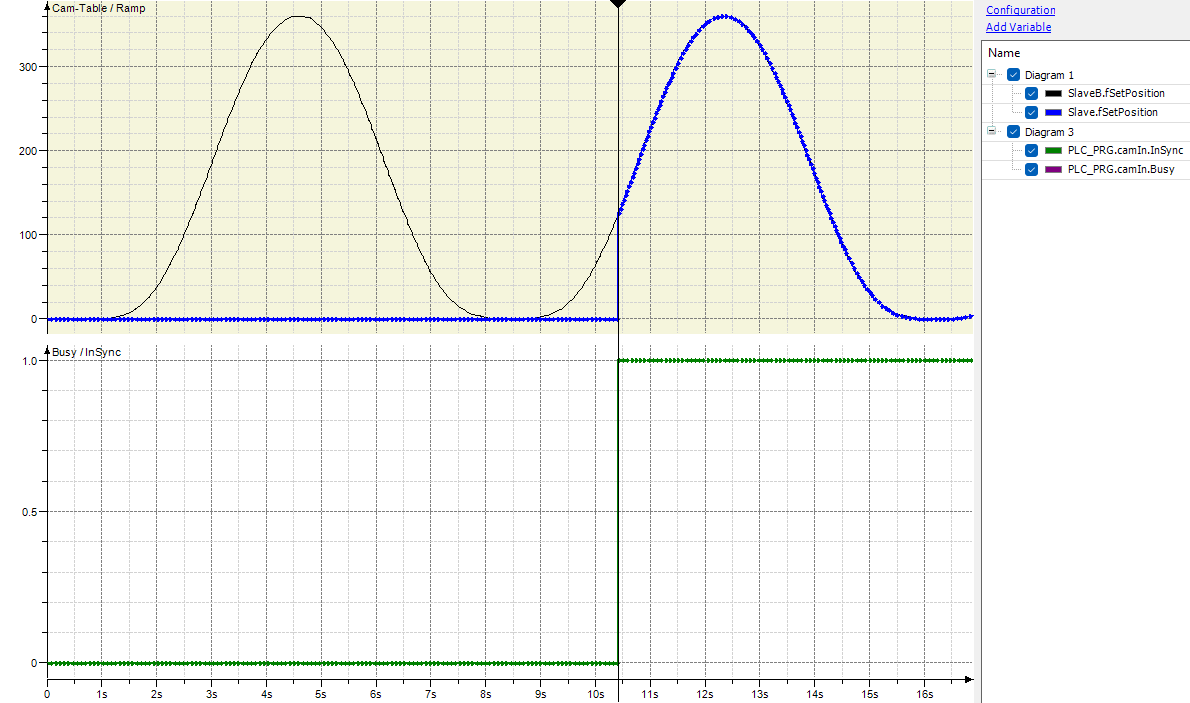
In the diagram below, the start mode is absolute, the slave position (blue dots) jumps to the cam position (black line) immediately.
Ramping in with a Trajectory
With the start modes ramp_in, ramp_in_pos,
and ramp_in_neg, the slave synchronizes to the cam as
fast as possible using the configured VelocityDiff, Acceleration,
Deceleration, and Jerk. If the slave is a modulo axis,
ramp_in_pos and ramp_in_neg define the
direction for ramping in. For a finite Slave, all three modes behave
the same.
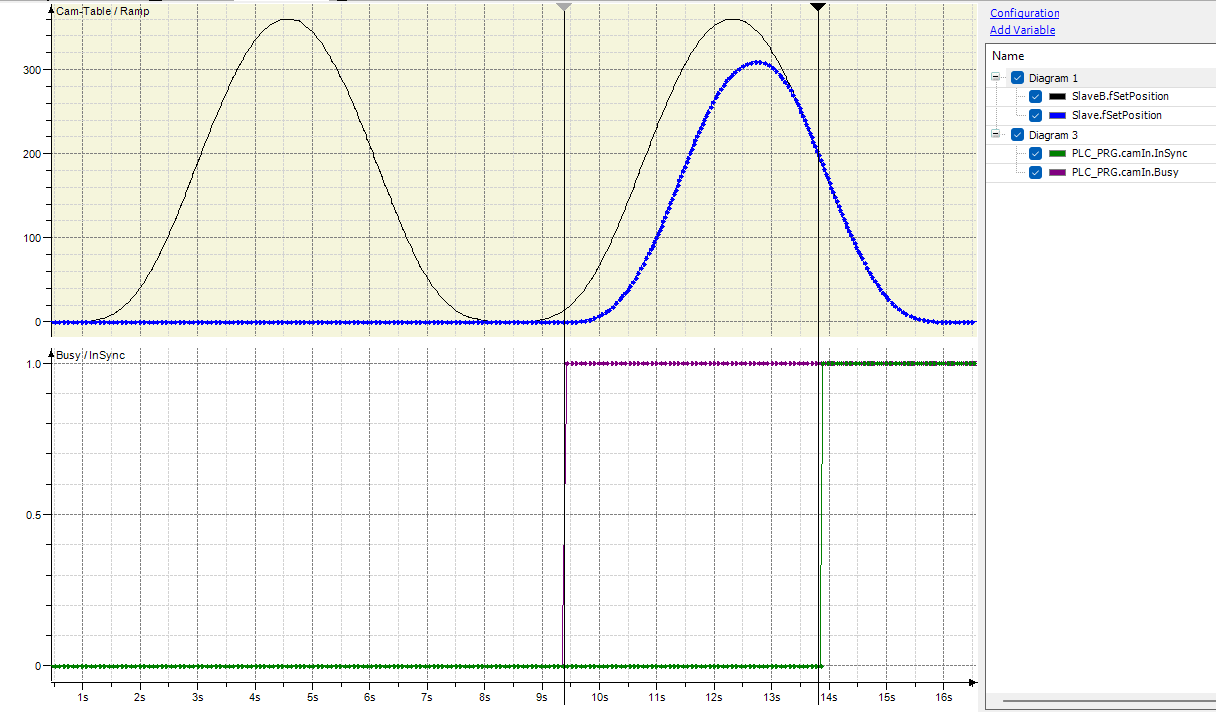
In the diagram below, the start mode is ramp_in. The slave position (blue dots) is ramped to the cam position (black line) and reaches it after the cam reaches the maximum position of 360.
Ramping in based on a Distance
With the start mode ramp_in_dist, the slave synchronizes to
the cam so that it is InSync as soon as the master axis reaches the
MasterSyncPosition. Synchronization will start when the
master axis is within the MasterStartDistance of the MasterSyncPosition.
If MasterStartDistance is 0 (or negative), then the slave movement
is started immediately, provided that the master is not in standstill.
If BufferMode <> Aborting, then the MasterStartDistance must
be 0 (or negative).
The MasterSyncPosition` must be a valid position in the cam table,
otherwise the error SMC_CI_MASTER_SYNC_POSITION_OUT_OF_SCALE
is reported.
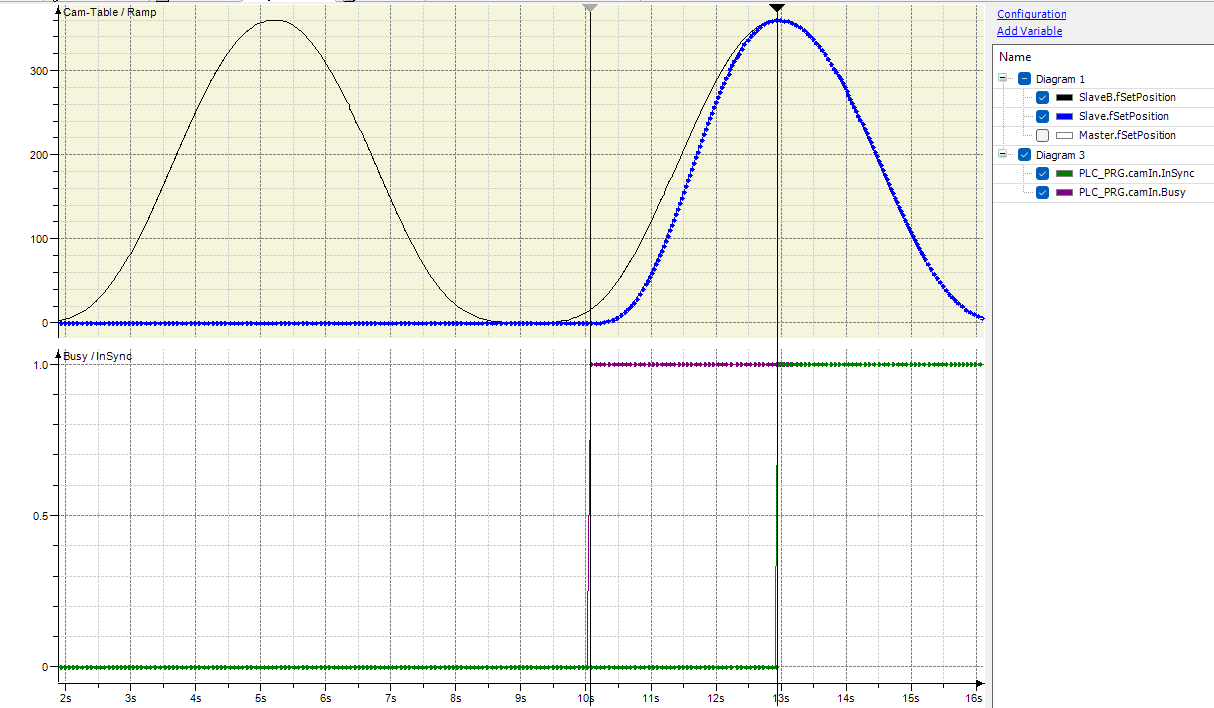
In the diagram below, the start mode is ramp_in_dist. The master sync position is 180, and the master start distance is 0. The slave position (blue dots) is ramped to the cam position (black line) and reaches it exactly at master position 180, when the cam reaches the maximum position of 360.
Avoiding reversals of the slave axis
For some applications, a reversal of the slave axis is not allowed. For
distance based ramping in, the input AvoidReversal will avoid a
reversal of the slave during ramping in.
The avoidance is only applied to modulo slave axes. If a reversal cannot be avoided, the axis is stopped with an error.
Behavior:
If the slave axis is a modulo axis and the master velocity (times the slope of the cam table at the
MasterSyncPosition) is not opposite to the slave velocity, thenMC_CamIntries to avoid a reversal of the slave. It tries to “stretch” the slave movement by increasing the distance the slave travels by up to 5 slave periods. If this “stretching” is not successful, i.e. does not avoid a reversal, an error is reported.If the slave velocity is opposite to the master velocity times the slope of the cam table at the
MasterSyncPosition, an error is reported.If the slave axis is not a modulo axis, an error is reported on the rising edge of the Execute input.
Changing the Cam Table
Using the input BufferMode
The recommended way to execute a second cam table after a first one is to buffer a second instance of MC_CamIn with the second cam table.
When loading the second cam table with MC_CamTableSelect, MasterAbsolute
and SlaveAbsolute both must be set to FALSE. The StartMode
for the second MC_CamIn instance must be set to relative and the
BufferMode to Buffered.
The second MC_CamIn instance will then start as soon as the first instance
reports EndOfProfile while automatically making the transition as smooth
as possible.
Changing the input CamTableID
Note
It is no longer recommended to change the cam table by changing the
CamTableID.
For the recommended way to change the cam table on
EndOfProfilesee SwitchingCamsUsingBufferMode.To immediately change the cam table simply restart MC_CamIn with
BufferModeAborting, the desiredStartMode, and the newCamTableID.
While camming is active, this input can be used to change cam tables on
the fly without a new rising edge on Execute.
Compared to restarting camming with a rising edge on Execute,
there are a few differences:
If ramping in with
StartModeramp_in, ramp_in_pos, or ramp_in_neg is active, it is not aborted.Even if the
StartModeis ramp_in, ramp_in_pos, or ramp_in_neg, no new ramping in is initiated.If
EndOfProfilehas been set in the same cycle, the new cam table is automatically offset so that no gap occurs between the two tables.
Please note that when using distance based ramping in (ramp_in_dist),
the error SMC_CI_CAM_CHANGED_DURING_RAMP_IN_DIST is returned if
the CamTableID changes while ramping in is still active.
Tappets
Tappets can be evaluated using the function block SMC_GetTappetValue.
The input TappetHysteresis allows to define a hysteresis for the
tappets of the cam table.
A positive value means that the tappet cannot fire immediately after
it has fired. The master position first needs to
move away from the tappet by more than the value given for
input TappetHysteresis.
For example, if the master is an encoder, the master position may oscillate by a few increments around the tappet position. Without a hysteresis, the tappet may fire all the time.
End of Profile
The output EndOfProfile indicates that the cam profile has been
completed, either in positive or negative master direction.
For periodic cams, the output is set for one cycle for each new period.
For non-periodic cams, the output stays TRUE while the Master
is outside the cam range. The Slave will remain in synchronized_motion.
If the Slave is not in standstill when EndOfProfile is reached,
another movement must be commanded that takes control of the Slave.
MC_CamIn does not stop the Slave on EndOfProfile.
A buffered movement that has been commanded after this movement
is started as soon as EndOfProfile is set. This behavior
is the same for periodic and non-periodic cams.
Note that with StartMode ramp_in, ramp_in_pos, or ramp_in_neg and
depending on the configured VelocityDiff, Acceleration,
Deceleration, and Jerk, it is possible that the Master reaches
EndOfProfile before the slave is InSync.
Note
MC_CamIn should be called after the motion FB controlling the
Master axis has been called. Otherwise, the Slave axis
will lag behind the Master axis.
- InOut:
Scope
Name
Type
Initial
Comment
Inout
MasterReference to master axis.
SlaveReference to slave axis
Input
ExecuteBOOLRising edge: Starts the execution of the function block.
MasterOffsetLREALOffset on the master cam table position in master cam table units.
SlaveOffsetLREALOffset on the slave axis position in slave axis units.
MasterScalingLREAL1
Scaling factor for the master axis position. Must not be 0.
SlaveScalingLREAL1
Scaling factor for slave cam position. Must not be 0.
MasterStartDistanceLREALThe master distance (in master cam table units) from the
MasterSyncPositionwhere the slave axis starts synchronization. Only used inStartModeramp_in_dist. See RampInDist.MasterSyncPositionLREALThe master position in the cam table where the slave axis has to be synchronized to the master. Only used in
StartModeramp_in_dist. See RampInDist.AvoidReversalBOOLFALSE: Signals that the reversal of the slave is physically possibleand acceptable.
TRUE: Signals that a reversal of the modulo slave has to be avoided,e.g. because it is physically impossible or might lead to damage.
See AvoidReversal.
StartModeabsolute
The start mode defines how the slave begins camming on a rising edge of input Execute. See StartModes.
CamTableIDIdentification of the cam table. The input is connected with the output of MC_CamTableSelect. See ChangingCamTableID.
BufferModeMC_BUFFER_MODEDefines the chronological sequence of the FB relative to the previous block.
Only the buffer modes
Aborting,BufferedandBlendingPreviousare supported.A cam table can be executed after a single axis command such as MC_MoveAbsolute using the buffer modes
BufferedorBlendingPrevious.BlendingPreviousmeans that the velocity (including the direction) of the previous movement is used as the blending velocity, even if this movement has the opposite direction compared to the cam table.For switching between cam tables, see SwitchingCamsUsingBufferMode.
If the function block is Busy, then only the
BufferModeAbortingis allowed.VelocityDiffLREALMaximum velocity difference in u/s for
StartModeramp_in, ramp_in_pos, and ramp_in_neg.AccelerationLREALAcceleration in u/s² for
StartModeramp_in, ramp_in_pos, and ramp_in_neg.DecelerationLREALDeceleration in u/s² for
StartModeramp_in, ramp_in_pos, and ramp_in_neg.JerkLREALJerk in u/s³ for
StartModeramp_in, ramp_in_pos, and ramp_in_neg.TappetHysteresisLREALSize of the hysteresis for tappets in user units [u]. See Tappets.
Output
InSyncBOOLIndicates that the
Slavefollows the cam profile.BusyBOOLExecution of the function block has not finished.
ActiveBOOLIndicates that the FB has control on the axis
CommandAbortedBOOLCommand has been aborted by another command
ErrorBOOLSignals that an error has occured within the function block.
ErrorIDSMC_ERRORError identification
EndOfProfileBOOLIndicates that the
Masterhas reached a start or end of the cam table. (Whether it is the start or the end depends on the direction of the master axis.) See EndOfProfile.TappetsSMC_TappetDataTappets: Has to be evaluated by SMC_GetTappetValue function block. See Tappets.