How To: Activate a license on a license server offline
The CODESYS License Server for Linux SL also provides the capability of offline activation of licenses via web-based management.
For more information about CODESYS License Server for Linux SL, see the following: CODESYS License Server for Linux SL.
Activation with the CODESYS License Server for Linux SL (Linux only)
To activate a license ticket on the CODESYS License Server for Linux SL via the Cockpit plug-in, proceed as follows:
In CODESYS Development System, run the Tools → Deploy Control SL command.
The deployment tool will open in the editor.
Provide your credentials and connect to the device.
The status changes to Connected.
Switch to the Operation tab.
In the list box, select the CODESYS License Server for Linux SL product.
Under Actions, click the command.
The WBM (web-based management) will open in the browser.
Log in with your Linux credentials.

Cockpit will open in the browser
Click the CODESYS WBM (1) → CODESYS Licensing (2) commands.

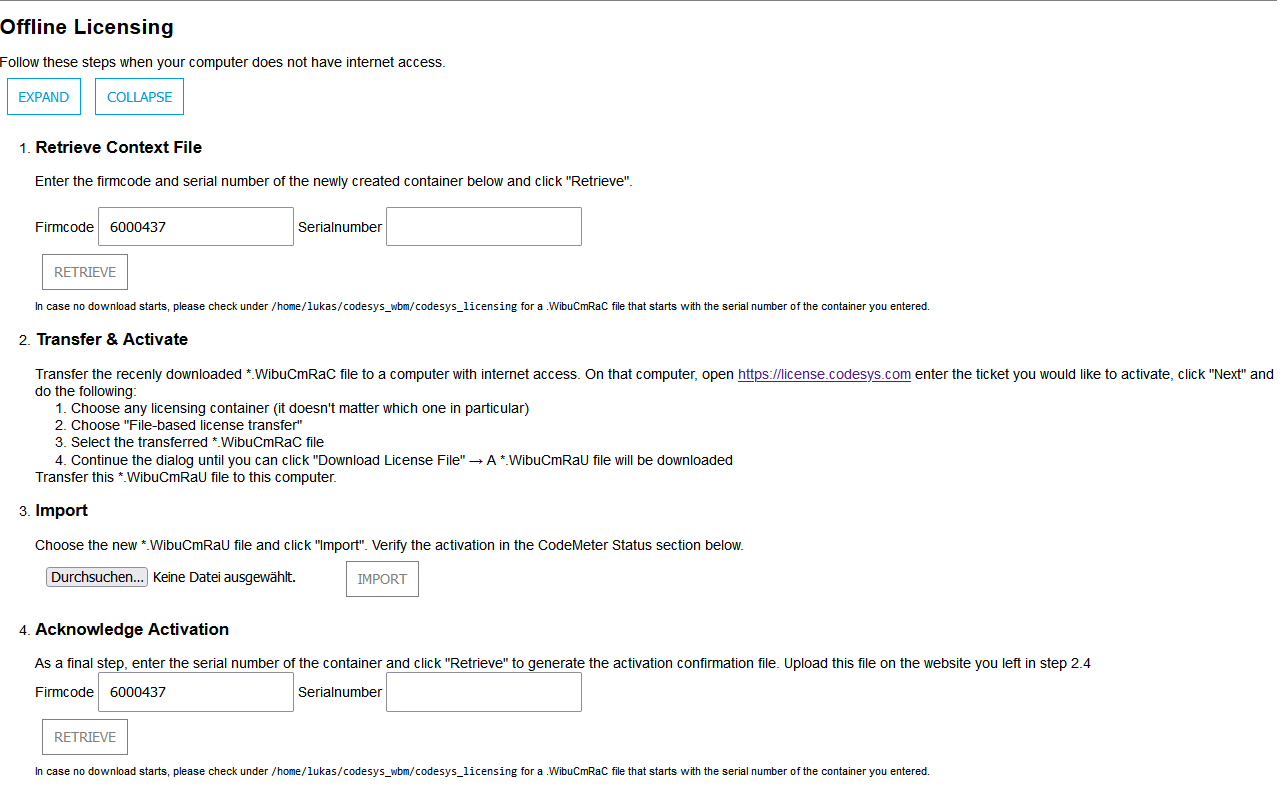
Under Offline Licensing, click the EXPAND button.
Enter the firm code and serial number of the license container in the respective fields and click RETRIEVE.
The license request file
*.WibuCmRaCwill be saved.Transfer the license request file to a computer with Internet access.
Open the CodeMeter License Central WebDepot in your browser and enter the ticket which you want to activate.
Follow the dialogs and download the license activation file
*.WibuCmRaU.Transfer this file back to the other computer.
In section 3. Import, click Browse and select the file.
Under 4. Acknowledge Activation, enter the serial number and click RETRIEVE to create an acknowledgement file.
Upload the file to https://license.codesys.com under File-based license transfer.
Next step: How To: Use a license on a license server