Using API Calls to Control Alarms Programmatically

Alarms of observation type Alarm (API) are triggered programmatically in the application code using the functionality of the AlarmManager library and the IAlarmHandler9 interface. Alarms can be activated (ActivateAlarm)) or deactivated (DeactivateAlarm) via the interface. The state transitions can be set as desired. These kinds of alarms are defined either directly in an alarm group or as an alarm instance in an alarm group template.
Unlike observation via events (Event (API), alarms can be used for all alarm classes with all acknowledgement methods.
Important
Depending on the alarm class and its acknowledgement methods, it may be necessary for the visualization user to acknowledge the alarm at runtime.
Alarming via API
Defining an alarm with Alarm (API) type
In
Alarm Configuration, set an alarm group.In an alarm group, define an alarm of the observation type Alarm (API).
In the Class column, select for example the alarm class
Warning Orangeand specify the desired alarm message under Message.
The alarm ID_36, which is triggered via API, is defined.
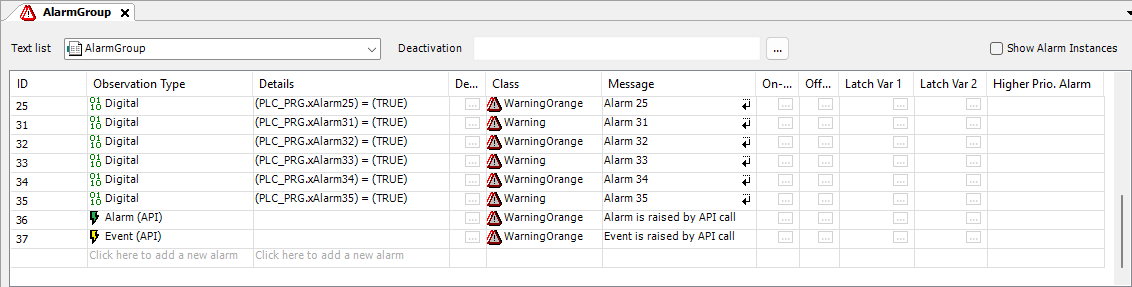
You can define such an alarm with any alarm class. Details are not required, which means that an alarm condition is not given. The alarm is triggered via an API call.
Implementing an API call
Set the cursor at the program position where the API call should take place.
Insert the API call.
Tip
Let the Input Assistant (F2) help you with this.
Implementation
This code activates the alarm
ID_20in the alarm groupAlarms1Line.// Activate by API Call Alarmmanager.AlarmGlobals.g_AlarmHandler.ActivateAlarm(1,Alm_Alarms1Line_Alarm_IDs.ID_20);
This code deactivates the alarm
ID_20in the alarm groupAlarms1Line.// Deactivate by API Call Alarmmanager.AlarmGlobals.g_AlarmHandler.DeactivateAlarm(1,Alm_Alarms1Line_Alarm_IDs.ID_20);
Alarming with alarm (API) via alarm instance
This is particularly relevant for library developers. Furthermore, alarm states can be explicitly set programmatically via the provided API methods.
Defining an alarm with Alarm (API) type
In
Alarm Configuration, set an alarm group template.In an alarm group, define an alarm of the observation type Alarm (API).
In the Class column, select for example the alarm class
Warningand specify the desired alarm message under Message.
The alarm ID_0, which is triggered via API, is defined.
Tip
You can also define an API alarm in an alarm group.
Implementing a function block and an API call
Add a function block to your application to set the alarm states of the newly defined alarm in the IEC code.
Select the application node and click the Add Object → POU command.
Configure the POU as follows: name
MyAlarmFB, type Function block, implementation language ST.Declaration
FUNCTION_BLOCK MyAlarmFB
VAR_INPUT
END_VAR
VAR_OUTPUT
END_VAR
VAR
END_VAR
Select the POU and add the
ActivateAlarmandDeactrivateAlarmmethods.Open the ST editor of the
ActivateAlarmmethod and program the library call.Tip
Let the Input Assistant (F2) help you with this.
This code activates the alarm
ID_0from the alarm group template.METHOD ActivateAlarm : BOOL VAR_INPUT END_VAR
// Activate Alarm Instance Alarm by API Call
Alarmmanager.AlarmGlobals.g_AlarmHandler.ActivateAlarmInstance(THIS, Alm_AlarmGroupTemplate_Alarm_IDs.ID_0);
Open the ST editor of the
DesctivateAlarmmethod and program the library call.This code deactivates the alarm
ID_0from the alarm group templateAGT.METHOD DeactivateAlarm : BOOL VAR_INPUT END_VAR
// Deactivate Alarm Instance Alarm by API Call
Alarmmanager.AlarmGlobals.g_AlarmHandler.DeactivateAlarmInstance(THIS,Alm_AlarmGroupTemplate_Alarm_IDs.ID_0);
Object navigator
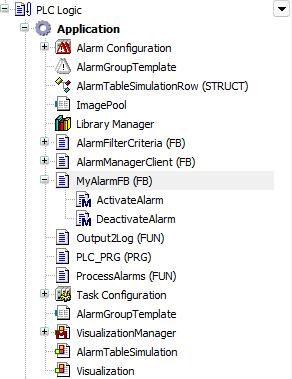
Instantiate the function block in the alarm group template.
Open the editor of
AlarmGroupTemplateand click the vertical ellipsis button in the Type for alarm definition row.The Input Assistant opens.
Under
Application, select theMyAlarmFBfunction block.
The alarm definition is instantiated.
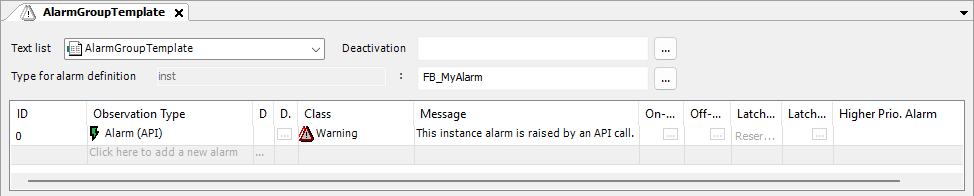
Implement the API call in IEC code and add the alarm calls at the desired locations.
Declaration
PROGRAM PLC_PRG
VAR
    alarmTemplateInstance : MyAlarmFB;
END_VAR
Implementation
    // Deactivate by API Call
    alarmTemplateInstance.DeactivateAlarm();
// Activate by API Call alarmTemplateInstance.ActivateAlarm();Create the alarm instances.
Open the
Alarm Configurationeditor and click the Alarm Instances tab.Click the Create or update alarm instances button.
The alarm instances within the
Alarm Configurationare recognized and updated.