SFC Element: Action
Symbol: 
An action contains one or more statements in one of the available programming languages. You can assign an action to a step or transition.
Actions which you call in SFC steps must be created as POUs in the project.
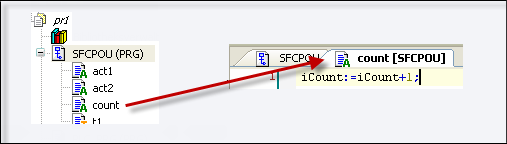
Exception: In the case of IEC actions which you add to a step as an action association, you can specify a Boolean variable instead of an action object. The value of this variable changes between FALSE and TRUE on each execution of the action.
Important
You need to uniquely define the step names within the scope of the superordinate POU. An action written in SFC must not contain a step with the same name as the step to which it is assigned.
There are IEC actions and step actions.
IEC action
IEC actions are actions according to the standard IEC 61131-3. They are executed according to their qualifier.
IEC actions are executed twice: one time when the step becomes active and a second time when it is deactivated. When you assign multiple actions to a step, the list of actions will be processed from top to bottom.
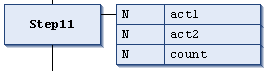
Each action box contains the qualifier in the first column and the action name in the second column. Both can be edited directly.
Important
If the same global Boolean variable is associated as an IEC action in different SFC POUs, then this may lead to unwanted override effects.
Unlike step actions, IEC actions allow you to use different qualifiers.
Another difference from step actions is that each IEC action is provided with a control flag. This makes sure that the action is only ever executed just once at any given time, even if it is called simultaneously by another step. This cannot be guaranteed for step actions.
You use the Insert Action Association command to assign an IEC action to a step.
Step action
Step actions are actions which you can use to extend the IEC standard.
Entry action:
The action is performed once after the step has been activated and before the main action is executed.
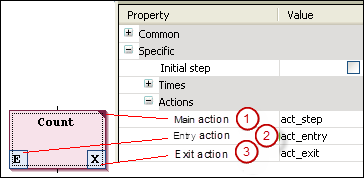
You use the Entry action element property to reference a new action or one already created under the SFC object from within a single step (2).
You can use the Add Entry Action command to add a new action to the step. The entry action is displayed with an
Ein the lower left corner of the step box.Main action:
This action is executed after the step has been activated and any entry action has already been executed. However, unlike an IEC action, it will not be executed a second time when the step is deactivated. You cannot use qualifiers here either.
(1) You can use the Main action element property to add an action to an existing step.
You can double-click the step element to create and add a new action.
A main action is displayed with a solid triangle in the upper right corner of the step box.
Exit action:
This action is executed once after the step has been deactivated. However, note that the execution will not take place in the same cycle, but only at the beginning of the next one.
You can use the Exit action element property to reference a new action or one already created under the SFC object from within a step (3).
You can use the Add Exit Action command to add an exit action to the step.
The exit action is displayed with an
Xin the lower right corner of the step box.
Difference between IEC actions and step actions
The key difference between IEC actions with N qualifier and step actions is that the IEC action is always executed twice: one time when the step becomes active and a second time when it is deactivated. See the following example:
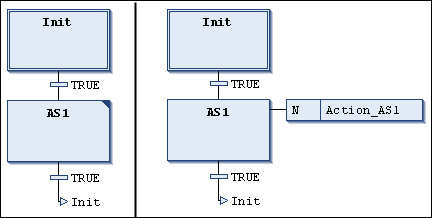
For the step AS1, you have added the action Action_AS1 once as a step action (left) and once as an IEC action with qualifier N. Because two transitions are switched in both cases, it takes 2 PLC cycles in each case until the initial step is reached again. Assume that a counter variable iCounter is initialized at 0 and incremented in the action Action_AS1. After reactivating the Init step, iCounter has the value 1 in the example on the left. In the example on the right, however, it has the value 2 because the IEC action is executed a second time due to the deactivation of AS1.
Another difference is that step actions can be embedded. In this case, they can only be accessed from the affected step. When you copy this step, new action objects will be created automatically and the implementation code for each will be copied. You define whether or not a step action is embedded, either when inserting the first action in the step or later via the Duplicate on copy element property. Generally, this behavior can also be preset in the SFC options.
A Boolean variable could also be specified for IEC actions instead of an action object. This is not possible for step actions.