Qualifiers for Actions in SFC
You assign qualifiers to IEC actions which are associated with a step. The qualifier defines the execution behavior of the respective action – in what way, when, and for how long it is executed.
Qualifiers are processed by the SFCActionControl function block in the library IecSfc.library. The library is automatically embedded in the project as soon as CODESYS SFC has been installed.
For more information, see the following: Programming in SFC
| Non-stored | The action is active as long as the step. |
| overriding Reset | The action executed with |
| Set (Stored) | The action is executed as soon as the step becomes active. The action execution continues, even after the step has been deactivated, until it gets a reset. |
| time Limited | The action is executed as soon as the step becomes active. The action is executed until the step is deactivated or the given time span has elapsed. |
| time Delayed | The action is executed after the step has become active if the specified delay time has elapsed and the step is still active. The action is executed until the step is deactivated. |
| Pulse | The action is performed exactly twice: one time when the step becomes active and the second time when the step is deactivated. |
| Stored and time Delayed | The execution of the action will only start when the specified delay time has elapsed after the step has become active. The action is executed until it gets a reset. |
| Delayed and Stored | The execution of the action will only start when the specified delay time has elapsed after the step has become active and the step is still active. The action is executed until it gets a reset. |
| Stored and time Limited | The action is executed as soon as the step becomes active. It is executed until the specified time has elapsed or it gets a reset. |
Note
An action with the qualifier S, SD, DS, or SL continues running after the step becomes inactive.
For the qualifiers S, SD, and DS, the action only ends with a resetting call to the same action with the R qualifier. This kind of call is necessary for the action to end.
For the SL qualifier, the action ends automatically as soon as the specified time has elapsed, or prematurely by a call with R.
You need to specify the times for the L, D, SD, DS, and SL qualifiers in the format of a TIME constant.
For more information about how to use qualifiers, see the following: Examples for Qualifiers.
Tip
When an IEC action is deactivated, it is executed one more time. This means that CODESYS executes this kind of action at least twice. This also applies to actions with the P qualifier.
Examples for Qualifiers
This section contains examples of how to use qualifiers.
Example: Smoke ventilation in a ventilation system
The qualifier of an action determines when the action starts and how long it runs. The example shows the same process in three implementations of the Sequential Function Chart (SFC). The implementations differ by the use of qualifiers.
The initial situation: A ventilation system uses a smoke sensor to monitor the air. When the sensor detects smoke, the controller immediately activates the smoke ventilation.
POU with an N qualifier
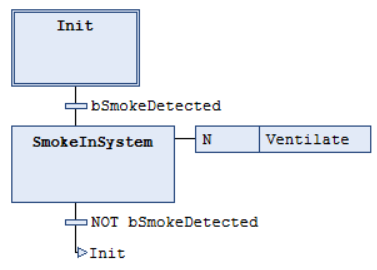
The POU contains the simplest flow. When the smoke sensor detects smoke, the step with the Ventilate action becomes active. The step calls the action with the N qualifier. The smoke ventilation runs as long as the sensor detects smoke.
Create a POU in SFC and change the name to
Simple_N. For more information, see the following: Creating a POU in SFCIn the declaration part of the created POU, create the following Boolean variables:
PROGRAM Simple_N
VAR
    bSmokeDetected: BOOL;
    bVent: BOOL;
END_VAR
Change the transition of the initial step: click the transition and use the Input Assistant
 to assign the
 bSmokeDetectedvariable.After the transition of the initial step, add a step named
SmokeInSystem.Change the transition of the
SmokeInSystemstep: click the transition and use the Input Assistant to assign the bSmokeDetectedvariable. AddNOT:NOT bSmokeDetectedIn the device tree, right-click the newly created POU
Simple_Nand select the Add Object → Action command. Assign the nameVentilateand select Structured Text (ST) as the implementation language.Insert the following code there:
// The alternation simulates the running ventilator.
bvent := NOT bvent;
Click the
SmokeInSystemstep and use the SFC → Insert Action Association command to add an action association.The N qualifier will now be assigned to the associated action.
Click in the right field of the association and use the Input Assistant
to select the Ventilateaction.A simple smoke ventilation has been set up.
POU with two N qualifiers
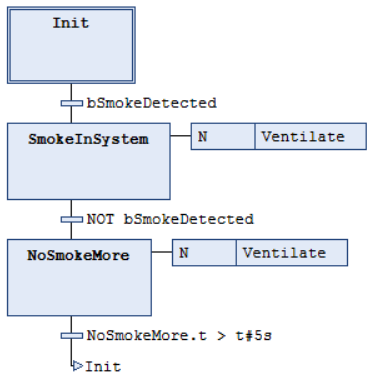
Problem: A residual amount of smoke remains in the system. The smoke ventilation must therefore run 5 seconds longer.
The POU handles the follow-up time by using an additional step. When the smoke sensor detects smoke, the step with the Ventilate action becomes active. The step calls the action with the N qualifier.
When the sensor no longer detects smoke, the controller switches to step NoSmokeMore. The smoke ventilation continues to run. The transition following the step evaluates the implicit step variable with the condition NoSmokeMore.t > t#5s. This variable contains the time that the step has been active.
After 5 seconds, the condition is fulfilled and the step becomes inactive. This also ends the execution of the Ventilate action.
Create a POU in SFC and change the name to
Advanced_N_N. For more information, see the following: Creating a POU in SFCIn the declaration part of the created POU, create the following Boolean variables:
PROGRAM Advanced_N_N
VAR
    bSmokeDetected: BOOL;
    bVent: BOOL;
END_VAR
Change the transition of the initial step: click the transition and use the Input Assistant
to assign the bSmokeDetectedvariable.After the transition of the initial step, add a step named
SmokeInSystem.Change the transition of the
SmokeInSystemstep: click the transition and use the Input Assistant to assign the bSmokeDetectedvariable. AddNOT:NOT bSmokeDetectedIn the device tree, right-click the newly created POU
Advanced_N_Nand select the Add Object → Action command. Assign the nameVentilateand select Structured Text (ST) as the implementation language.Insert the following code there:
bvent := NOT bvent;
Click the
SmokeInSystemstep and use the SFC → Insert Action Association command to add an action association.The N qualifier will now be assigned to the associated action.
Click in the right field of the association and use the Input Assistant
to select the Ventilateaction.Add a step named
NoSmokeMoreafter the transition of theSmokeInSystemstep and add a transition with the conditionNoSmokeMore.t > t#5s.Click the
NoSmokeMorestep and use the SFC → Insert Action Association command to add an action association.The N qualifier will now be assigned to the associated action.
Click in the right field of the association and use the Input Assistant
to select the Ventilateaction.The smoke ventilation will stop after
5seconds.
POU with S and R qualifiers
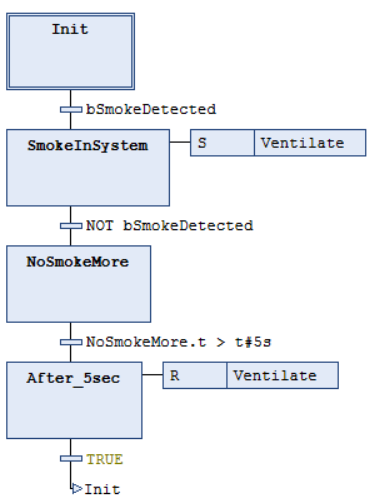
Problem: A residual amount of smoke remains in the system. The smoke ventilation must therefore run 5 seconds longer.
Here too, the controller immediately activates the smoke ventilation. The SmokeInSystem step calls the Ventilate action with the S qualifier. During the NoSmokeMore step, the smoke ventilation continues to run however, because the action is stored with the S qualifier and only ends with R.
The POU solves the follow-up time with an additional NoSmokeMore step. After 5 seconds, the condition is fulfilled and the step becomes inactive.
The additional After_5sec step calls the Ventilate action with the R qualifier. The step resets the action and therefore stops the smoke ventilation after 5 seconds.
Create a POU in SFC and change the name to
Advanced_S_R. For more information, see the following: Creating a POU in SFCIn the declaration part of the created POU, create the following Boolean variables:
PROGRAM Advanced_S_R
VAR
    bSmokeDetected: BOOL;
    bVent: BOOL;
END_VAR
Change the transition of the initial step: click the transition and use the Input Assistant
to assign the bSmokeDetectedvariable.After the transition of the initial step, add a step named
SmokeInSystem.Change the transition of the
SmokeInSystemstep: click the transition and use the Input Assistant to assign the bSmokeDetectedvariable. AddNOT:NOT bSmokeDetectedIn the device tree, right-click the newly created POU
Advanced_S_Rand select the Add Object → Action command. Assign the nameVentilateand select Structured Text (ST) as the implementation language.Insert the following code there:
bvent := NOT bvent;
Click the
SmokeInSystemstep and use the SFC → Insert Action Association command to add an action association.Click in the left field of the association and use the Input Assistant
to select the Squalifier.Click in the right field of the association and use the Input Assistant
to select the Ventilateaction.A simple smoke ventilation has been set up.
5 secondsAdd a step named
NoSmokeMoreafter the transition of theSmokeInSystemstep and add a transition with the conditionNoSmokeMore.t > t#5s.Add another step named
After_5secafter the transition of theNoSmokeMorestep and add a transition with the conditionTRUE.Click the
After_5secstep and use the SFC → Insert Action Association command to add an action association.Click in the left field of the association and use the Input Assistant
to select the Rqualifier.Click in the right field of the association and use the Input Assistant
to select the Ventilateaction.The smoke ventilation will stop.