SFC elements: Step / Transition
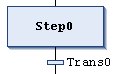
Symbol:  Step
Step
Symbol:  Transition
CODESYS generally inserts steps and transitions as a combination. If you insert a step without a transition or a transition without a step, then this will cause an error during the compile. You can change the name by double-clicking it.
For information about working in the SFC editor, see also: Programming in SFC
Important
Step names must be unique within the scope of the superordinate POU. Keep this in mind, especially when using actions that are also programmed in SFC.
Note that you can convert a step into an initial step by clicking Init Step or by setting the respective property in the SFC Element Properties.
All steps are defined by the step properties, which you can display and edit in the Properties view, depending on the set options.
Actions which are executed when the step is active must be added to the step. There are “IEC actions” and “step actions”. For more information, see the following: Action
A transition must contain the condition under which the subsequent step should become active when the value of the condition is TRUE. As a result, a transition condition must have the value TRUE or FALSE. It can be defined in the following two ways:
Important
It is the responsibility of the user to assign the desired expression to a transition variable in case the transition contains multiple statements.
Directly as an inline condition
To do this, replace the default name of the transition with:
Boolean variable
Boolean address
Boolean constant
Expression with a Boolean result
Example:
(i<100) AND b
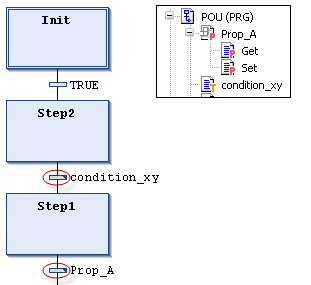
Separately using a POU of the type transition or property
Replace the default transition name with the name of a transition POU
 or a property
  . Use the Project → Add Object command to create these objects.
This allows for multiple use of transitions. The object can have any code implemented in any of the available languages.
Transitions which reference a transition or property object are indicated by a small triangle in the upper right corner of the transition rectangle.
Programs, function blocks, or assignments are not permitted here.
For more information, see the following: Method call

In contrast to CoDeSys V2.3, CODESYS handles a transition condition like a method call. The following example illustrates the syntax.
trans1 := a=100
The same condition as a direct inline:
a=100