Licensing on Read-Only File Systems via EWF
In version 4.21.0.0 and higher, CODESYS supports licensing using a new container type. This page describes how to switch between container types, what to consider, and what a backup with EWF looks like.
Product list
The following products support licensing via EWF:
Product | Support as of version |
|---|---|
CODESYS Control for Linux SL | 4.21.0.0 |
CODESYS Control for Linux ARM SL | 4.21.0.0 |
CODESYS Control for Linux ARM64 SL | 4.21.0.0 |
Difference between EWF and UFC
A UFC container stores relevant information in many different places within the system.
An EWF container stores the relevant files in a configured path, making it very suitable for read-only file systems or backup/restore scenarios.
Important
Mixed operation of UFC and EWF containers is not possible.
After the change to EWF, UFC containers will no longer be available. Changing back to UFC is possible. The UFC containers will be available again.
Your purchased license must already support EWF. All recently issued SL licenses are already correctly configured. Instructions for checking whether your license is already configured correctly can be found below this notice.
Before switching, the runtime system and the licensing service must be stopped.
EWF can only be used with Codemeter Runtime. You can check the table on the How To: Backup and restore a CODESYS license page to verify whether or not your product is licensed with CodeMeter Runtime.
Checking a license for EWF support
Open the CodeMeter License Central WebDepot.
Type in your license ticket and click NEXT.
In the next dialog, click Activate Licenses.
In the selection of container types now displayed, check if the option named
CODESYS-Control SL-V1is available: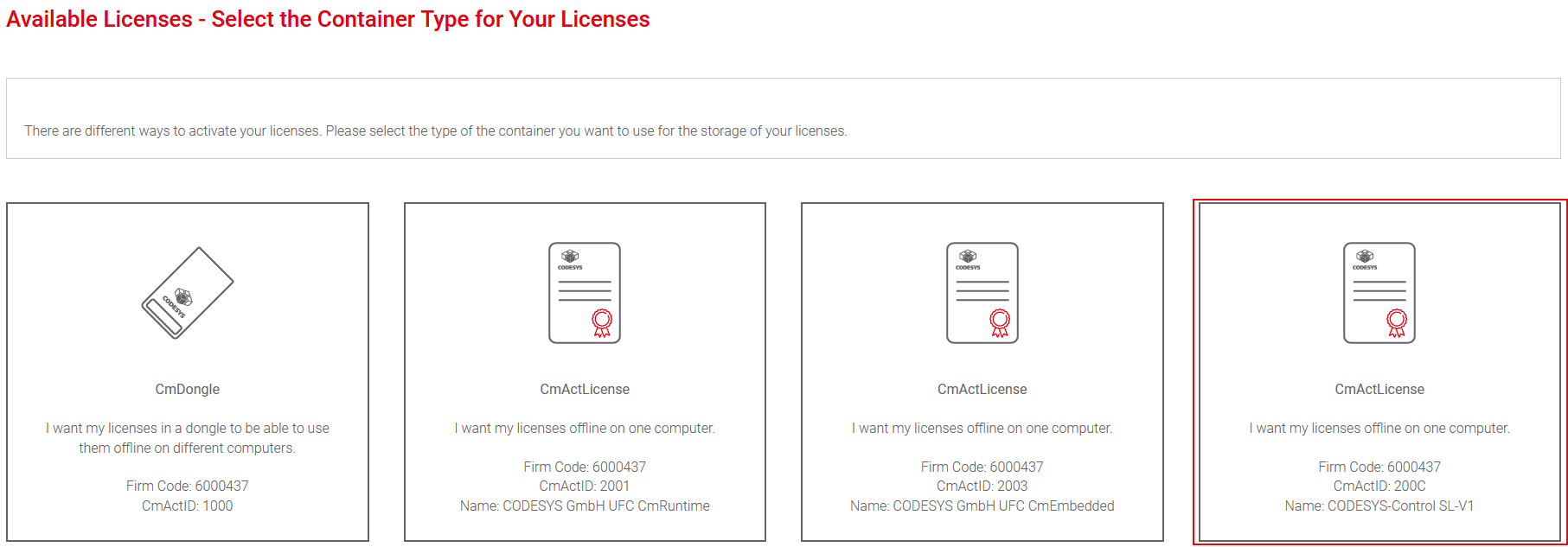
If this option is not visible, then your license does not yet support the new container type. In this case, you can contact customer support to have the license adjusted.
Important
Do not continue the process. The license is activated on the target device in a different way: How To: Licensing
Switching between container types
Connect to the target device.
For more information, see the following: Establishing a Connection.
Open the Operation tab and select the runtime service.
In the actions, click the License Container Settings button. A dialog will open. Note the provided information.
The current container type is preselected. To change the type, select the respective option and click Apply.
The runtime system and licensing service will be stopped, reconfigured, and restarted.
Now you can import new licenses into the new container.
For more information, see the following: WIBU cmu Tool
As an option, the CODESYS License Server for Linux SL also provides a web-based interface to change to EWF.
For more information about the product, see the following: How To: Install a license server
Log in to the WBM of the target device.
Open the CODESYS WBM page. Make sure that you have enabled the administrator mode.
Scroll to the bottom and click the Change Type button.
A dialog will open. Note note the displayed instructions.
The current container type is preselected. To change the type, select the respective option and click Apply.
The licensing service will be stopped, reconfigured, and restarted.
Now you can import new licenses into the new container.
For more information, see the following: How To: Activate a license on a license server
The two previous options automatically change the container type. If you cannot use these options due to special restrictions, then you can also make the change manually.
Stop the runtime system:
systemctl stop codesyscontrol(only if the runtime system is installed on this device).Stop the licensing service:
systemctl stop codemeter.To enable EWF:
In
/etc/wibu/CodeMeter/Server.ini, configure the following settings:EnableCmActWriteFilterHandling=1CmActPath=<storage location>
In
CmActPath, create the specified folder.In
CmActPath, set the ownership of the folder specified todaemon:daemon.In
/etc/codesyscontrol/CODESYSControl.cfg, configure the following settings (only if the runtime system is installed on this device):In the
[CmpCodeMeter]section, remove or comment outInitLicenseFile.0.In the
[SysFile]section, add two entries:PlaceholderFilePath.1=<path from CmActPath>, $.cmact_licenses$PlaceholderFilePath.1.View=1
To disable EWF:
In
/etc/wibu/CodeMeter/Server.ini, configure the following settings:EnableCmActWriteFilterHandling=0CmActPath=(blank)
In
/etc/codesyscontrol/CODESYSControl.cfg, configure the following settings (only if the runtime system is installed on this device):In the
[CmpCodeMeter]section, addInitLicenseFile.0=.UFC_SoftContainer_CmRuntime.WibuCmLif.In the
[SysFile]section, remove two entries:PlaceholderFilePath.1=<path from CmActPath>, $.cmact_licenses$PlaceholderFilePath.1.View=1
Start the licensing service:
systemctl start codemeter.Start the runtime system:
systemctl start codesyscontrol(only if the runtime system is installed on this device).
You can now use EWF containers and licenses on the device. For more information, see the WIBU cmu Tool help page. To create the container, use CODESYS-Control_SL-V1.WibuCmLif, which is provided with version 4.21.0.0.
Backup and restore
For instructions about how to create a backup and restore from a backup, see the help page How To: Backup and restore a CODESYS license in the "Codemeter Runtime" section.