SFC Element: Branch
Symbol: 
You use branches when you program parallel or alternative flows in SFC.
In the case of alternative branching, CODESYS executes only one of the branches at a time, depending on the preceding transition condition. Parallel branches are executed simultaneously.
For more information, see the following: Programming in SFC and Processing Order
Parallel branches
In parallel branching, the branches must begin and end with steps. Parallel branches can contain more branches.
The horizontal line before and after the branch is a double line.
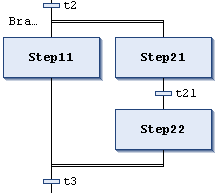
Processing in online mode: If the preceding transition (t2 in the example) yields TRUE, then the first steps in all parallel branch lines are active (Step11 and Step21). CODESYS processes the individual branch lines at the same time and the subsequent transition is evaluated afterwards (t3).
A Branch<n> jump marker is automatically added to the horizontal line which indicates the start of a branch. You can specify this marker as a jump target.
Note that you can use the Alternative command to convert a parallel branch into an alternative branch.
Alternative branches
The horizontal line before and after the branch is a single line.
In alternative branching, the branches must begin and end with transitions. The branches can contain more branches.
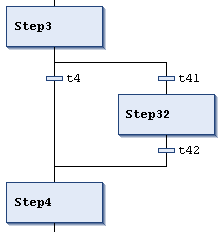
If the step preceding the branch is active, then CODESYS evaluates the first transition of each alternative branch line from left to right. In the first transition which yields TRUE, the corresponding branch is opened – meaning the step following the transition is activated.
Note that you can use the Parallel command to convert an alternative branch into a parallel branch.