The CODESYS Recipes Recipe Manager
The CODESYS Recipes add-on is a system for storing and loading sets of variables (recipes) to a controller or via the programming system. The Recipe Manager makes it possible to centrally manage different configurations or parameter states of an application, save them to the controller, and restore them when needed. This allows the behavior of the application to be flexibly adapted to different operating states or product variants.
Using the Recipe Manager in a CODESYS project
In order to use the Recipe Manager, a Recipe Manager object must be added below the application in the device tree. At least one recipe definition must be added below the Recipe Manager so that recipes can be created, managed, and processed.
For more information, see the following: Recipe Definition
Basic principle of recipe management
A recipe consists of a defined set of variables. These comprise the recipe definition. When loading or writing a recipe, all variables contained in a recipe are simultaneously updated on the controller. As a result, parameter groups can be set or read in a consistent and reproducible way.
Settings such as storage location and storage format are configured in the Recipe Manager object. Any number of recipe definitions can be created below this object.
Recipes can be:
Stored in files
Loaded from files to the controller
Managed exclusively within the controller
Using recipes on remote devices
When data source variables are involved and a data source exchange is configured, variable values from recipes are automatically transferred to/from another controller. Reading and writing occurs synchronously. This means that all variables configured in a recipe definition are updated at the same time.
After reading or writing, you can use the call g_RecipeManager.LastError to check whether or not the transfer was successful (g_RecipeManager.LastError = 0).
Operating concepts
Recipe management can be controlled from different levels:
CODESYS programming interface
You can manually load, edit, and save the recipes directly in the programming interface.
Visualization
In the visualization, the call of the recipe commands is implemented by using the input configuration (execute command) for a visualization element. By doing this, a visualization user can control the execution of recipe commands.
Application program
At runtime, the recipe definition and the recipe commands can be called in the application program. To do this, you implement the process for writing, reading, or monitoring recipe definitions in your code by using the methods of the
RecipeManCommandsfunction block from theRecipeManagementlibrary.For more information, see the following: RecipeManCommands (FB)
Loading modes
The Recipe Manager supports two loading modes for loading recipe files:
Exact matching
Data from a recipe file is loaded only if its structure completely and exactly matches the variable list of the respective recipe definition.
Selective matching
All variables from a recipe file which appear in the variable list of the recipe definition are loaded, regardless of their position in the list. Variables for which no data exists in the recipe file will not be updated.
The selected loading mode in the Recipe Manager is particularly relevant in the following situations:
A recipe file has been created or modified with an external editor and no longer exactly matches the internally configured variables or the order of them.
A recipe file has been extended for a new application, but can no longer be used in older projects which do not expect these additional variables. (A simpler solution would be to create a V2 file, but the loading mode can also contribute to compatibility.)
When the recipe file cannot be loaded
If a recipe file cannot be loaded, then set the loading mode to Selective Matching. Note that this setting applies to all recipes loaded into the application where the Recipe Manager is integrated.
For more information, see the following: Recipe Manager
File access
Access to external files which are located outside of the PLC file system is restricted for security reasons. As a result, any attempt to open or write files in external directories will fail.
In the case of CODESYS Control Win SL, the default path refers, for example, to the directory of the runtime files PlcLogic which represent the internal PLC file system.
To avoid access violations, use this directory or another internal directory of your specific controller as the root path.
If the PLC file system is not accessible – or should not be accessible – via the file explorer of the host system, then use Tab: File within CODESYS to manage files (for example, those used in recipes).
Troubleshooting
The following procedures are available for evaluating error states:
Capturing the error code returned by an operation
Compare the return value with the defined error states from the list of ReturnValues (GVL).
Fetching the last error which occurred
To get the last error code which occurred, use the
RecipeManCommands.GetLastError()method.
For a detailed analysis of whether a loading operation was fully or partially successful (for example, if not all variables of a recipe have been loaded), use the RecipeManCommands.GetLastInfo() method.
This method provides an info code which can be evaluated using the InfoValues (ENUM) enumeration.
Tip
Stored error codes may have to be reset manually, for example using the RecipeManCommands.ResetLastInfo() method.
Detection of changes
To easily detect changes, use the InfoValues (ENUM) enumeration as described in the troubleshooting section.
If more detailed information about state changes is required, then you can implement redundant data structures. This lets you compare the previous state and current state of a recipe, as well as the current variable values on the controller.
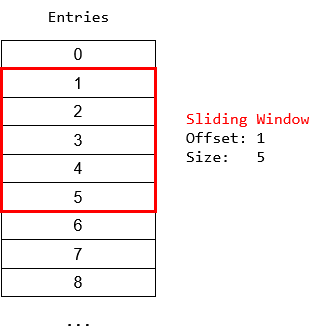
Sliding window mechanism
The sliding window mechanism is frequently used to read recipe values and their variable names.
It is used to view a defined range of entries within a significantly larger buffer by using a window size and an offset (positioning of the window on the data list).
For more information, see the following: RecipeManCommands.GetRecipeValues (), RecipeManCommands.GetRecipeVariableNames (), and RecipeManCommands.GetRecipeNames()
Naming scheme for recipe files
Recipe files follow a defined naming scheme so that they can, for example, be uniquely identified in the file system.
Note the following naming scheme: <recipe>.<recipe definition>.<extension>
Recipe: Name of the specific recipe.Recipe definition: Name of the respective recipe definition.Extension: File extension (e.g. .txt or .csv) which is specified in the device tree on the Recipe Manager tab.
Special functionality for floating-point numbers
For variables of type REAL or LREAL, a distinction is made whether or not the value is exactly convertible.
If it is possible to convert the value exactly, then only the numerical value is saved in the recipe file.
If exact conversion is not possible, then a hexadecimal encoded string is written in the recipe file next to the numeric value. This should have the effect that also a non-convertible floating-point number returns the same value.
This feature can be disabled with the RECIPE_GENERATE_SIMPLE_STRINGREAL compiler define.
Tip
In the object properties of the parent application on the Build tab, you can enter the RECIPE_GENERATE_SIMPLE_STRINGREAL compiler define in the Compiler Defines field. As a result, no hexadecimal encoded string is stored.
For more information, see the following: Dialog: Properties: Build
Recipe management on the controller – memory usage
When you clear the Recipe Management in the PLC option, the Recipe Manager and recipe definitions will not use any memory on the PLC.
When you select this option, code is generated for the Recipe Manager and all recipe definitions, and this code is stored on the PLC. The size of the used memory primarily depends on the number pf recipes and their variables, as well as the data type of the variables. Whether or not the fields of the recipe definition are filled also has an effect. The memory usage of recipes cannot be calculated. It has to be determined by experimentation at the time it is needed. The following table merely provides some guiding principles.
Code Size (bytes) | Data Size (bytes) | Total (bytes) | |
|---|---|---|---|
Recipe definition with 100 | 194406 | 79400 | 267352 |
Recipe definition with 200 | 238318 | 121284 | 459344 |
Recipe definition with 300 | 282230 | 163084 | 543856 |
Recipe definition with 100 | 192742 | 69884 | 343168 |
Recipe definition with 200 | 235446 | 101568 | 436872 |
Recipe definition with 300 | 278146 | 133284 | 510072 |
Recipe definition with 100 | 203278 | 870084 | 1154000 |
Recipe definition with 100 | 255570 | 1709784 | 2973296 |
Recipe definition with 100 | 307886 | 2549484 | 2964112 |