Branch
A branch splits the processing line into two or more branches which are executed in succession from top to bottom. You can further branch each branch, which results in multiple branches being created within a network.
Each branch gets a marker symbol (small rectangle) at the branch point. You can select the marker symbol in order to perform additional actions or commands for the subnet.
For more information, see: Programming in the Ladder (LD2) Editor
Processing order and normalization
Normalized processing order
The processing order within a network has been changed to version 1.2.0.0. Now it corresponds to that which also applies in CODESYS LD FBD.
The elements in a network are always processed from left to right and from top to bottom. In the network shown below, the processing order is therefore: x1, x2, x3, x4, x5.
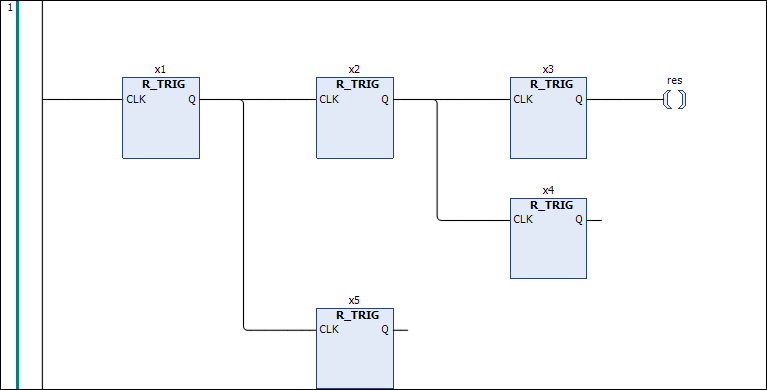
Ladder diagrams which were created with a version lower than 1.2.0.0 can contain networks with branches which are no longer usual. Due to the arrangement of the branches which was still possible in these versions, a processing order can arise under certain circumstances which corresponds to the behavior before version 1.2.0.0.
In the example, the processing order is x1, x2, x3, x4, x5:
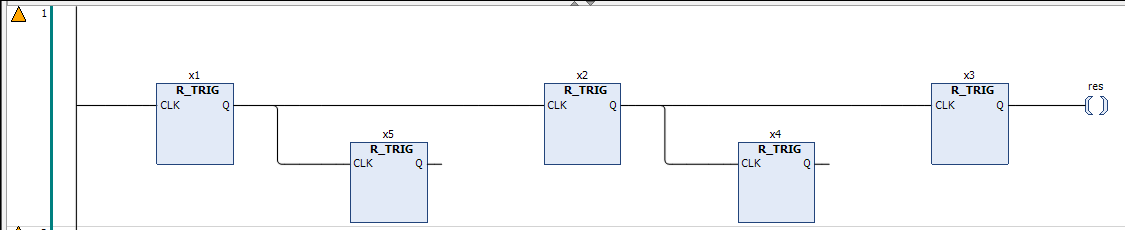
The yellow triangle  in the margin of the network indicates that the processing order is outdated. If you want to switch the network to the current processing order, double-click the triangle. The network is then normalized. This action cannot be undone.
A network is normalized as soon as you edit it.
In the message window, in the Ladder Inspection category, you receive a corresponding message for each network which is not normalized. You can then use the  button at the message to select commands for normalization.
Available commands
Normalize this network
Normalize all networks in this object
Normalize all networks in the project