Python制御構造(例付き)
ループ
CやSTとは対照的に、 for Pythonのループはループ変数をカウントしませんが、シーケンスを反復処理します。この種のシーケンスは、「辞書」、リスト、タプル、文字列内の文字、またはファイル内の行にすることができます。
次の例は、いくつかを示しています for ループ:
from __future__ import print_function

print("Enumerating over a simple list:")
for i in (1,2,3,4):
    print(i, end=", ") # end= replaces the newline with ", "
print()                # but we still need a newline at the end of this case.

print("Enumerating over the characters in a string:")
for i in "CODESYS": # characters are representet as strings of length 1.
    print(i, end=", ")
print()

print("Enumerating over the integers 1 to 4:")
for i in range(1, 5): # upper bound is exclusive.
    print(i, end=", ")
print()

print("Enumerating using xrange:")
for i in xrange(5): # xrange is similar to range, but needs less memory for large ranges.
    print(i, end=", ")
print()

print("Enumerating including the item number:")
for i, v in enumerate("CODESYS"):
    print(i, v)
結果の出力:
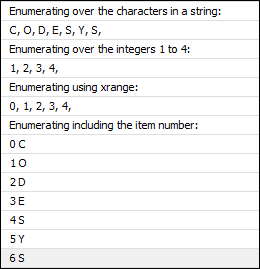
アイテムに加えてインデックスまたは番号が必要な場合は、次を使用する必要があります enumerate サンプルスクリプトの最後のケースに示されているように。次のコードは不適切なスタイルと見なされます。
text = "CODESYS"

for i in range(len(text)):   # BAD STYLE!
    v = text[i]              # DON'T TRY THIS AT HOME!
    print(i, v)
そのほか for ループ、Pythonにも while CおよびSTのループと非常によく似たループ:
i = 0
while i < 3;
    print(i)
    i += 1
注:この例はあまり実用的ではありません。あなたはおそらく使用するでしょう for 範囲のあるループ。
IF / ELSE
The if/else 構成は、他のプログラミング言語のものと似ています。簡単な例を次に示します。
from __future__ import print_function
i = int(system.ui.query_string("Please enter an integral number..."))
if i < 0:
    print("Your number was negative.")
elif i > 0:
    print("Your numer was positive.")
else:
    print("It seems your number was zero.")
The else ブランチはオプションであり、0、1、または多数の場合があります elif ブランチ。
関数、クラス、およびメソッド
Pythonでは、メソッドを使用して関数とクラスを定義できます。メソッドを持つクラスは、基本的にSTの関数ブロック、またはC ++、Java、C#などの言語のクラスに似ています。ただし、Pythonはインターフェースをサポートしていません。
詳細については、Pythonのドキュメントで定義を参照してください。 機能 と クラス。
#defining a function with name sum and two parameters a and b:
def sum(a, b):
    return a + b # we return the sum of a and b.

# we can now call the function defined above:
print(sum(5,7))

# Now we define a class Foo:
class Foo:
    # The class gets a method "bar".
    # Note: for methods, the first parameter is always "self" and
    # points to the current instance. This is similar to "this" in
    # ST and other languages.
    def bar(self, a, b):
        print("bar(%s,%s)" % (a,b))

# We create an instance of the class:
f = Foo()

# We call the method bar on the instance.
f.bar("some", "params")
モジュールと標準ライブラリ
IECでは、ライブラリをインポートして、他の記述されたコードで再利用できます。ペンダントとして、Pythonではモジュールをインポートする可能性があります。
The Python標準ライブラリ 次のようなさまざまな目的のための多くのモジュールが含まれています。
文字列処理
日付と時刻の処理
コレクション
糸脱毛
数学関数
ファイル処理
永続性
圧縮とアーカイブ
データベースアクセス
暗号化サービス
ネットワークとインターネットアクセス
メールの送信
独自のモジュールを作成するには、提供する関数とクラスを定義するPythonファイルを作成します。このファイルをサンプルスクリプトと同じディレクトリに保存します。ファイルに名前を付ける場合 mymodule.py、それからあなたはそれをインポートすることができます import mymodule。
これは、からコサイン関数と円周率定数をインポートして使用する例です。 math モジュール:
from math import cos, pi

print(pi) # prints 3.14159265359

print(cos(pi)) # prints -1.0
以下に、オペレーティングシステム、Pythonバージョン、およびインタープリターに関する情報にアクセスするその他の例を示します。
import os
print(os.environ["OS"])

from sys import platform, version, executable
print(platform)
print(version)
print(executable)
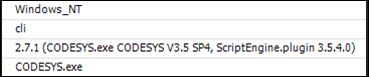
特別なモジュールがあります __future__ 新しい言語機能をアクティブ化するため。とりわけ、Python開発者が下位互換性のある新しい機能を導入するときに使用されます。これらの種類の機能は、特別な「__future__ ここでのサンプルスクリプトのほとんどで使用する1つの例は、次の新しい電源構文のアクティブ化です。 print ステートメントの代わりに関数として。
# make print() a function instead of a statement
from __future__ import print_function
Pythonドキュメントは完全な すべてのリスト __future__ 輸入。
通常のPythonモジュールに加えて、IronPythonコードはPythonモジュールであるかのように.NETアセンブリにアクセスすることもできます。これにより、 .NETFrameworkクラスライブラリ およびサードパーティライブラリ。これは、を使用してダイアログを開く方法の例です。 Windows Forms 図書館:
import clr
clr.AddReference("System.Windows.Forms")
from System.Windows.Forms import MessageBox

MessageBox.Show("Hello")