"The Native Safe House" Scenario: PLC + Safe + ProfiSafe + Time Provider
Note
The documentation on the following pages is provided for informational purposes only. For restrictions as well as safety or certification information, please consult the safety documentation of the manufacturer of the device that you are programming.
Requirements
Hardware
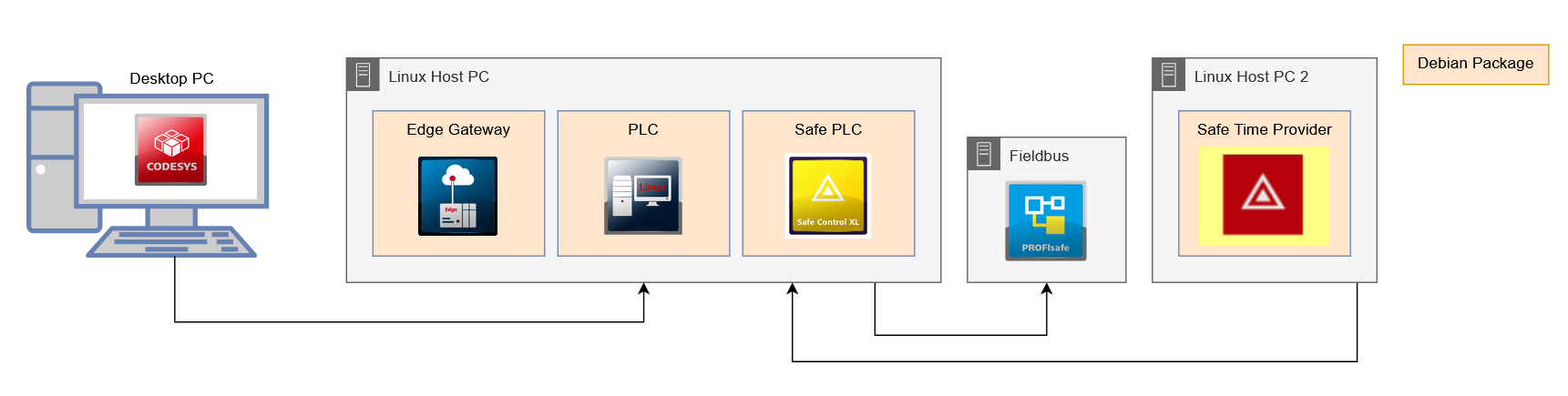
The following devices are required:
Desktop PC with CODESYS Development System installed
Linux host PC with 64-bit or 32-bit AMD architecture
The following additional devices are also required:
Host for the safe time provider (named Linux Host PC 2 in the diagram). Requirements for this host: Linux operating system with SSH server.
Real-time capable network to the Linux Host PC to ensure deterministic transmission of data packages.
The following add-on products must be installed on the desktop PC:
CODESYS Virtual Safe Control SL
CODESYS Control for Linux SL
CODESYS Edge Gateway for Linux SL
Linux Host PC
In order for the Safe PLC to be installed on the Linux Host PC, a 32-bit AMD architecture is required on the device. This 32-bit architecture can also be set up on a 64-bit device.
To do this, run the following commands on the command line, using sudo if necessary.
sudo dpkg --add-architecture i386
sudo apt-get install libc6:i386
This prepares the Linux Host PC for the Safe PLC. The Safe PLC can now be installed via the programming system like other products. To do this, proceed as follows:
Execute the Tools → Deploy Control SL command and establish a connection to the Linux Host PC (Communication tab).
For more information, see the following: Establishing a Connection
Install the newest versions of the following products (Deployment tab):
CODESYS Safe Control SL
CODESYS Control for Linux SL
CODESYS Edge Gateway for Linux
For more information, see the following: Installing Packages
Configuration of the CODESYS Safe Control SL
The standard configuration of the CODESYS Safe Control SL should initially be usable for most applications.
You can adjust the following parameters to suit your needs:
Parameter
Default Value
Explanation
Application priority
35
Runtime system priority (not Linux or IEC priority) for the application task
CPU
0
Pin the CmpSIL3 tasks to the specified core
External time task priority
9
Runtime system priority (not Linux or IEC priority) for the external time task
Port
60000
UDP port used for the external time provider
Configure the time provider.
The target IP address and the target port must be configured. The target is the Linux Host PC.
Target IP address
[IP or host name of the Linux Host PC]
Explanation
Port
60000
Port 60000 is the default for a CODESYS Safe Control SL to receive an external time source from the timer.
Other parameters are also configurable and can be adapted to your needs.
Parameter
Default Value
Explanation
Output interval
60
Output interval (in seconds) of the statistics of the time provider
CPU
0
Core where the time provider should be executed
Debug output
FALSEEnable or disable the debug output
Enable logging
FALSEEnable or disable writing log output to syslog
Priority
55
SCHED_FIFOscheduling priorityRedundancy enabled
FALSEEnable or disable the redundancy function of the time provider. (Requires an additional CODESYS Safe Time Provider)
Cycle time
3
The interval in which the time provider sends the timestamp packages
Linux Host PC 2
On the Linux Host PC 2, set up the time provider.
The time provider sends the current time to a configured destination and can be used to provide the second time required by the CODESYS Safe Control SL.
Execute the Tools → Deploy Control SL command and establish a connection to the Linux Host PC 2 (Communication tab).
For more information, see the following: Establishing a Connection
Install the newest versions of the following products (Deployment tab):
CODESYS Safe Time Provider SL
For more information, see the following: Installing an image
Switch to the Operation tab and select the CODESYS Safe Time Provider SL under Services.
Stop the time provider so you can configure it.
Configure the time provider.
The target IP address and the target port must be configured. The target is the Linux Host PC.
Target IP address
IP address or host name of the Linux Host PC
Port
6000
Port 60000 is the default for a CODESYS Safe Control SL to receive an external time source from the timer.
Other parameters are also configurable and can be adapted to your needs.
Click the Save button to accept the changes.
Start the time provider.
All the required devices are now ready. You can now download your applications to the controllers. The next steps for creating a project and integrating PROFIsafe are described in the CODESYS Safety Extension documentation.