Diagnosis – Access and Storage
CODESYS logger
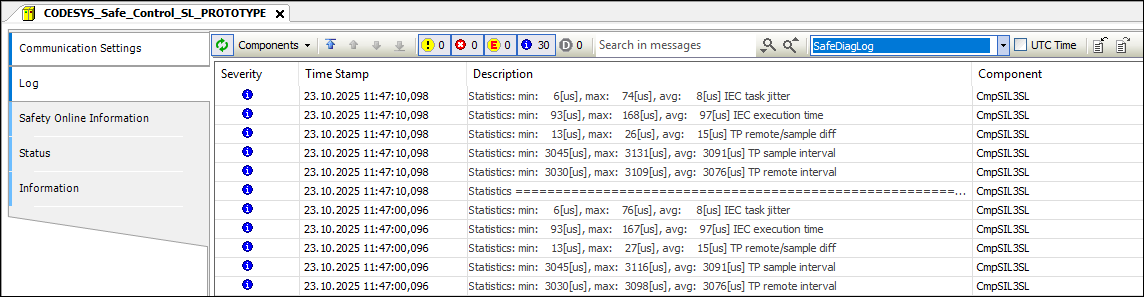
A new logger named SafeDiagLog has been created for the diagnosis values. By default, this logger is enabled and writes the diagnosis values to standard output and to the SafeDiagLog.csv file on the controller.
 |
The outputs are also visible in CODESYS on the Log tab of the device editor. For this, the selection of SafeDiagLog logger must be made be selected:
 |
CODESYS Safe Control Core library
The diagnosis values are accessible from the application of the respective standard controller via the StdPLCItf with the help of CODESYS Safe Control Core library.
An instance of the PLCDiagnosis function block can be used to read the diagnosis values from the standard controller.
 |
The function block requires a data buffer in which the diagnosis values are stored as the pDataBuffer parameter.
The byNumDataBufferElements parameter can be used to specify the size of the data buffers.
The structure of the data is defined in the interface library CODESYS Safe Control Interfaces (PLCDIAGNOSIS_DATA).
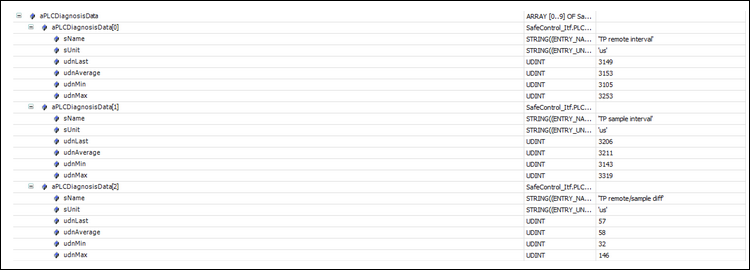
The following data is contained in the structure:
sName: Name of the diagnosis datasUnit: Unit of the diagnosis dataudnLast: Last recorded valueudnAverage: Average of all recorded dataudnMin: Minimum recorded valueudnMax: Maximum recorded value
After the function block instance PLCDiagnosis is called, the data is currently located in the configured data buffer and can be further processed by the application or used for the purpose of diagnosis.
 |