Runtime Process with Dedicated User
Some CODESYS products now have their own user and group which have permissions for the corresponding process to run. This increases the security of the system and gives system administrators more control over what the application and the runtime process can change on the system.
Note
These are users on the operating system, not CODESYS application users.
Version table
This table shows which products as of which versions have a dedicated user and group, as well as any known restrictions.
Product | Dedicated user as of version | User, Group | Restrictions |
|---|---|---|---|
CODESYS Control for Linux ARM SL CODESYS Control for Linux ARM64 SL | 4.21.0.0 |
| See the following restrictions |
CODESYS Edge Gateway for Linux | 4.21.0.0 |
| No known restrictions |
CODESYS Safe Control SL | 4.21.0.0 |
| No known restrictions |
CODESYS TargetVisu for Linux SL | 4.21.0.0 |
| No known restrictions |
Restrictions
There are restrictions for the following products when the runtime process runs as a dedicated user:
The use of GPIOs via
sysfsrequires that the runtime process runs as root.The use of XDP requires that the runtime process runs as root.
The use of retains in NVRAM requires that the runtime process runs as root.
Changing the user
Runtime Deploy Tool
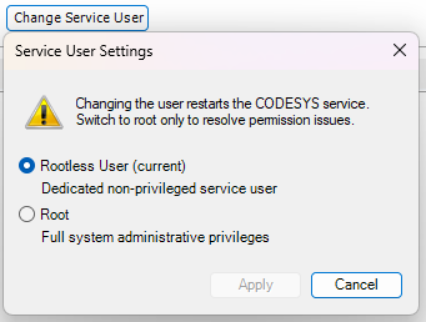
When you use the Runtime Deploy Tool, you can click the respective product on the Operation tab. In the actions, click the Change Service User button. A dialog will open where you can switch between the root user and a dedicated user. Note the instructions in the dialog:
Manual
Stop the runtime system.
Open the file
/etc/default/<product>– for example/etc/default/codesyscontrol.Replace
codesyscontrolwithrootand save and close the file.Edit the service configuration using the command
systemctl edit <product>– for example,systemctl edit codesyscontrol.Remove the comment symbol from the lines under
[Service]: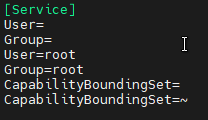
Save and close the file.
Start the runtime system.