Module Declaration
Modules in the CODESYS Application Composer are defined in a module declaration. The module declaration is a separate object in the POU pool and forms the basis for using a module in the module tree.
Objects in the POU:
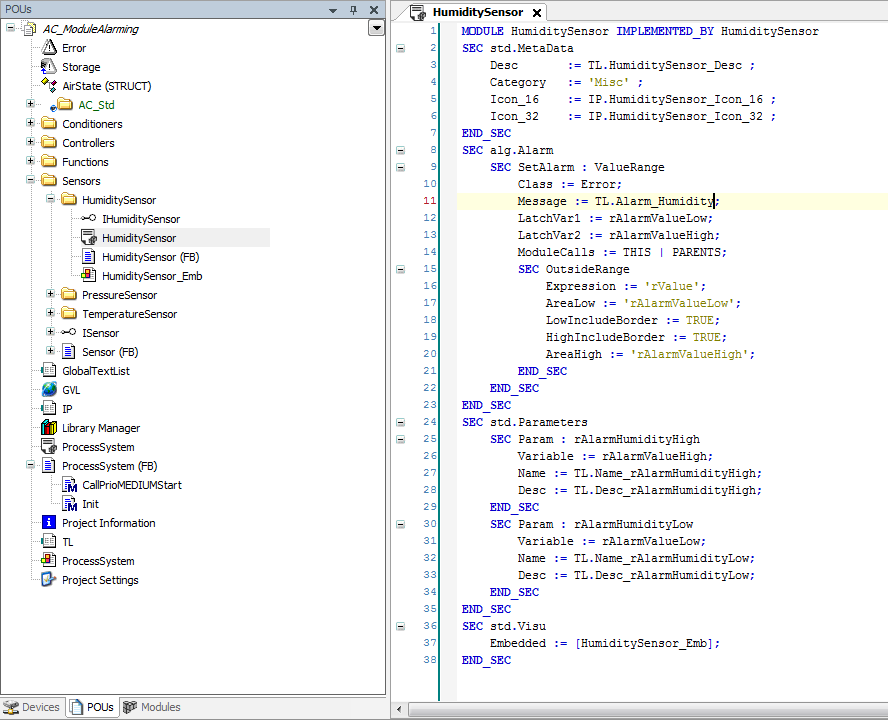
Modules are declared with their own description language which is similar to the declaration of variables in the ST code (Structured Text).
Each module declaration is based on a function block (module FB).
The module FB contains the functional logic.
The module declaration adds configuration and structural information to the module FB.
Parameters
Input variables of the module FB can be marked as parameters to enable structured parameterization of the module.
Module inputs and outputs
The input and output variables of the module FB can be defined as module I/Os and connected to variables, other modules, or device I/Os.
Slots
Slots allow for the integration of other modules as sub-modules, thus defining a hierarchical module structure.
Default submodules
Predefined assignments for module slots which are automatically applied when a module is inserted.
Visualizations
Modules can provide page visualizations as well as embedded visualizations which are automatically generated and linked.
Proxy module FBs
Proxy function blocks can be defined to implement references across application or controller limits.
Instance references
References to FB instances which the user maps to specific instances only at configuration time.
Alarms
Modules can use the CODESYS alarm management to define and evaluate alarms for variables of the module FB.
Process flags
Flags for using modules in sequential processes (e.g. step chains).
Format of the module declaration
A header of the form MODULE<name> begins the declaration. This is followed by a list of sections.
Each section is introduced by the keyword SEC (for "section") and a unique name. The keyword END_SEC closes the section. The contents of a section contain a list of entries consisting of more sections or definitions.
A definition consists of a name and an optional value and ends with a semicolon.
Comments can be used as in ST code: "//"" for a single line comment and "(*" and "*)" for multiline comments. Whitespace (tabs and spaces) and newline/linefeed can be used to separate the parts of a declaration. Otherwise they are ignored when processed.
As with ST code, uppercase and lowercase make no difference.
01    MODULE Persistence IMPLEMENTED_BY PersistenceFB
02    SEC MetaData
03        NAME       := TL.ChannelName ;
04        DESC       := TL.ChannelDesc ;
05        COLLECTION CATEGORY := ’Persistence’TL.Collection  ;
06        ICON_16    := IP.Channel16 ;
07        ICON_32    := IP.Channel32 ;
08    END_SEC
09    SEC Toplevel
10              SEC STANDARD_TASK : LOW
11                      NAME  := LOW ;
12                      DESC  := TL.TaskLow ;
13                      FLAGS := CREATE_IF_MISSING | READONLY ;
14              END_SEC
15              GVL_NAME := 'GVL_%InstanceName%' ;
16     END_SEC
The module name is defined in Line 01. IMPLEMENTED_BY defines the "PersistenceFB" function block which contains the logic of the module. This function block must derive from IModule. The MetaData section begins in Line 02 and it ends in Line 08. This section contains five definitions. The possibility of nested sections is shown in the Toplevel section (Lines 09–16) which contains the STANDARD_TASK subsection (Line 10).
Syntax of the module declaration
In this section, the syntax and the allowed syntactic structure of a module declaration is explained.
In the following scanner tokens is written in uppercase (example: ID). Non-terminals of the grammar is written in braces (example: {Entry}).
Lexical analysis (scanner)
In the first step, tokens (or lexemes) are created from the characters of the module declaration (example: keywords, constants, identifiers).
Whitespace as well as the newline and linefeed characters separate tokens, but are ignored otherwise. Comments are also ignored when processing the declaration. (Comments can be written in a single line (//") or multiline comments ((* and *)) as in to ST language. Multiline comments can be nested.
Basically a token has always a maximal length. For example, a123 is interpreted as an identifier and not as an identifier a followed by a literal 123.
The order of the tokens in the list below shows their priority, as described below. For example, the MODULE input is understood as keyword and not as identifier.
Keywords:
MODULE,SEC,END_SEC,IMPORTS, andIMPLEMENTED_BYOP: A non-empty sequence of the following characters:
.:,%()[]{}<>|+-*/@!?^°=\~Note: The comment markers
//,(*, and*)have higher priority than operators. On the other hand, a comment cannot begin inside an operator. For example, according to the rule of maximum length,+//+is interpreted as an operator and not as+followed by a comment.LIT: An IEC literal, as it is used in ST, example:
1.4,tod#12:13:14. This includes the Boolean literalsTRUEandFALSE(uppercase or lowercase is not relevant).Note: Untyped literals with a negative sign (
-1,-3.2) are read as two tokens, that is as operator-followed by an untyped literal. As a result, untyped numeric literals can never be negative. Typed literals (INT#-34) will always be interpreted as one token.ID: A valid IEC identifier (
[a-zA-Z_][a-zA-Z0-9_]*), whereby two consecutive underline characters are not allowed. In contrast to ST, this also includes the keywords of ST (e.g.FUNCTION,INT, andEXTENDS).SEMICOLON: The character
;
Syntax (parser)
The syntax of the module declaration is defined by the following grammar.µ is an empty sequence.
{MDecl}        ::= MODULE {QID} {ImplSpec} {ImportsSpec} {MBody}
{ImplSpec}     ::= IMPLEMENTED_BY {QID} | µ
{ImportsSpec}  ::= IMPORTS {QID} | µ
{MBody}        ::= {SecList}
{SecList}      ::= {Modifiers} {Sec} {SecList} | µ
{Sec}          ::= SEC {QID} {SecTarget} {EntryList} END_SEC
{SecTarget}    ::= OP(":") {QID} | µ
{Modifiers}    ::= OP("[") {ModifierList} OP("]") | µ
{ModifierList} ::= {QID} OP(",") {ModifierList} | {QID}
{EntryList}    ::= {Modifiers} {Entry} {EntryList}
{Entry}        ::= {Sec} | {Def}
{Def}          ::= {QID} OP(":=") {ValList} SEMICOLON |
                   {QID} SEMICOLON
{ValList}      ::= {Val} {ValList} | {Val}
{Val}          ::= ID | LIT | OP
{QID}          ::= ID | ID OP(".") {QID}
The list of definition values ({ValList}) must end with a semicolon. This simplifies the grammar and avoids ambiguities because the semicolon cannot be part of a value ({VAL}), except within a string literal.
The assignment operator (:=) of definitions ({Def}) also serves to avoid ambiguities ({QID}) of definition names and values.
Defined types for definitions
Text: ID.ID (text list name and text list identifier) - see Localization of text list strings
Image: ID.ID (image pool name and image pool identifier)
ID (IEC identifier)
QID (Qualified identifier):
{QID} ::= ID | ID.IDCategoryPath ::= {StringLiteral} | {CategoryPath}Cardinality:
[{MIN} .. {MAX}]|[ {MIN} .. INF [{MIN}, and{MAX}are integer, non-negative literals. If{MAX} != INF, then{MIN} <= {MAX}has to apply.StringLiteral: A IEC string literal may contain line breaks.
StdTaskFlags ::= {StdTaskFlag} | {StdTaskFlags} StdTaskFlag ::=
NONE|CREATE_IF_MISSING|READONLYLiteral: any IEC literal or QID (for Enum constants)
DTBoolFlag:
µ(empty sequence) |TRUE|FALSESlotType:
SUBMODULE|REFERENCEPragmas:
[ {PragmaList} ] {PragmaList} ::= {Pragma}|{Pragma} , {PragmaList} {Pragma} ::= { ( ID|{StringLiteral}|{OP2} )+ } {OP2}: every operator except{, }, [, ]and,.InstancePath:
InstancePath ::= {IComp}|{IComp} . {IComp}with{IComp} ::= ID {ArrayAccess}*and{ArrayAccess} ::= [ {IntList} ]and{IntList} ::= Int|Int , {IntList}TaskRef: Standard_Task. (
Low|Medium|High) |Custom_Task.ID
Instance paths
At some positions in the module declaration, instance paths can be defined to address a variable of a function block: For parameters, slots, I/Os, arrays with variable size and instance references.
An instance path is defined as a non-empty sequence of components, separated by dots: C1.C2…CN. A component must either be a IEC identifier or a component followed by an index expression [i1, …, iN], where i1 to iN are integer values.
Instance paths are always relative to the function block which implements the module logic. The first component of the instance path is a member (VAR_INPUT or VAR_OUTPUT, depending on the use case) of the function block. If the instance path has additional components, then these components address the variable within the member. Otherwise the member itself is addressed. Instance paths can be restricted to input or output variables (example: for I/Os). These restrictions are not valid for structures. These kinds of instance paths are called input instance paths and output instance paths.
Localization of text list strings
Texts in modules (example: description of module, name, description of parameter) can be displayed in different languages. These texts are managed in text lists.
The name of the language is of format
<LanguageCode>[-<Country/Region>](example:en-US,de-DE).<LanguageCode>is the name of the language according to ISO 639-1 (example:deoren).<Country/Region>is a country code according to ISO 3166.When retrieving a text list entry, the system first looks up for the whole language name. If nothing is found, the it will look for the
<LanguageCode>. If this search also fails, then the default text will be used.
Language | Name of the language |
|---|---|
Chinese | zh-CHS |
English | en-US |
French | fr-FR |
German | de-DE |
Italian | it-IT |
Japanese | ja-JP |
Portuguese | pt-PT |
Russian | ru-RU |
Spanish | es-ES |
Deriving module declarations
In the same way as for the object oriented inheritance of a function block A from a function block B ("EXTENDS"), it is possible to derive module declarations by using the IMPORTS keyword. The UPDATE and HIDE modifiers are treated specially.
The name of the imported module must be specified with namespace if this module is defined in a different library.
Cyclic imports are not allowed, in particular a module must not import itself. (Example for a cyclic import: module M_1 imports module M_2, M_2 imports M_3, …, M_N imports M_1 again.)
A derived module can be defined without the
IMPLEMENTED_BYdirective. In this case, the function block of the base module will be used.If a derived module via
IMPLEMENTED_BYspecifies a function block, then this function block must derive from the function block of the base module or must be identical to it.A derived module inherits all sections of the base module. It can add new sections or modify existing sections.
A section can be modified in the derived module by using the same name and target extended with the
UPDATEmodifier. In this case, its entries are changed. All missing definitions of the section in the derived module are applied from the base module.The
UPDATEandHIDEmodifiers can be used only if the respective section (name and target) is defined in the basic module. Conversely, a section which is defined in the base module can be used in the derived module only if it is provided with theHIDEorUPDATEmodifiers. If there is only theHIDEmodifier in the section and notUPDATE, then no definitions are allowed.Some entries must be changed in the derived module (example: the description).
MODULE MBase IMPLEMENTED_BY FBBase
SEC MetaData
        DESC := TL.Desc_Base ;
END_SEC
SEC Parameters
        SEC Param : paramxIn
                Variable := xIn ;
                Name     := TL.Param1_Name ;
                Desc     := TL.Param1_Desc ;
        END_SEC
END_SEC

MODULE MDerived IMPORTS MBase
[UPDATE] SEC MetaData
        DESC := TL.Desc_Derived ;
END_SEC
[UPDATE] SEC Parameters
        [UPDATE,HIDE] SEC Param : paramIn
                Variable := xIn ;
                DEFAULT := TRUE ;
        END_SEC
END_SEC
In the example above, the paramIn parameter of the MBase module is hidden in the derived module MDerived (by using the HIDE modifier), and at the same time a new default value (TRUE) is set.
Notes to the order of sections and definitions
The order of the sections directly after the module header is irrelevant. Within the sections, the order may be very important. For example, the order of the slot declarations defines the order of the modules in the module tree.
The order of the definitions is always irrelevant.
The sections of the base modules are always defined before the sections of the module itself.
If a section of the base module is changed by use of
UPDATEorHIDE, its order is not affected.It is not possible for a derived module to change the order as defined in the base module.
Auto-completion and "List components"
When start typing in the module editor all available/possible section definitions are shown in an "List components" menu. Only meaningful sections and definitions for the current position are shown. Even if some subsection entries have the same name as subsection entries of other sections, it will try to display only the matching section definitions.
If the Return key is pressed after completing the first line of a section, then the section will be completed with all necessary definitions/sections and the END_SEC .
After the variable definitions, the input/output variables are provided with a "List components" menu. Flags or predefined values are also provided with a "List components" selection, which shows the possible flags/values.
After definitions which use text list entries or image pool entries (example: most times Desc :=), a "List components" menu including all available and visible text lists or image pools and their entries is presented.
By pressing the F2 key, the corresponding input support can be opened.