User Interface of CODESYS 4
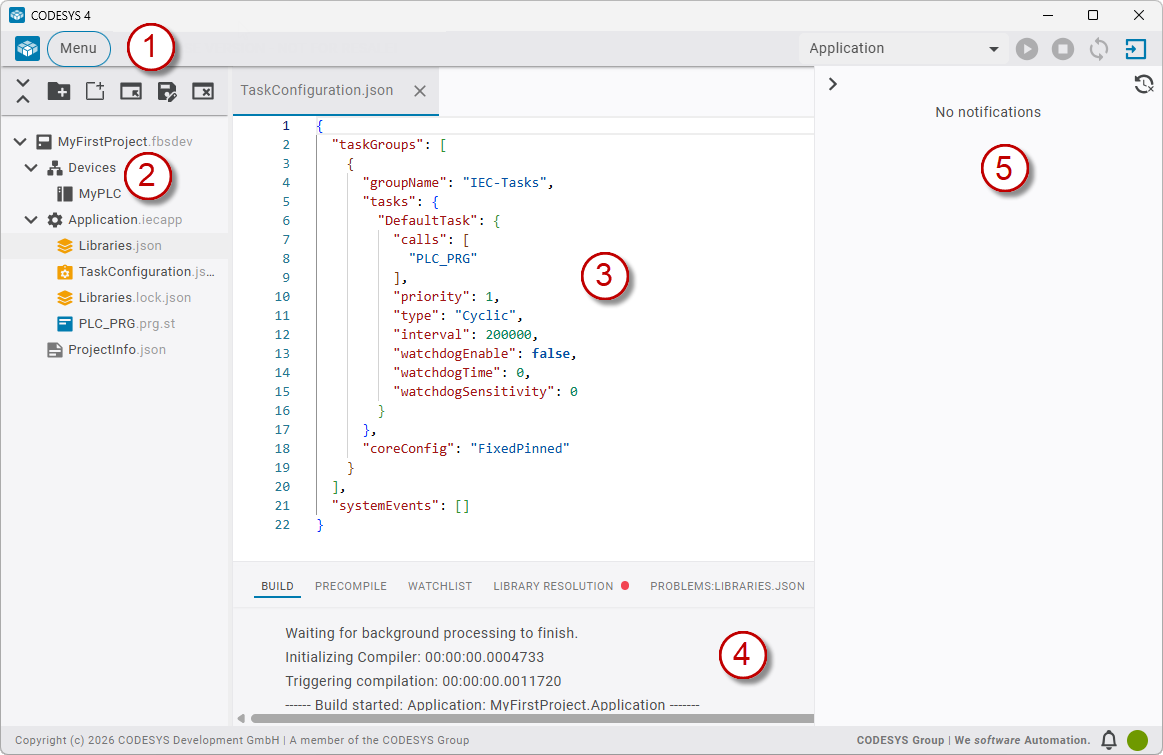
The user interface of CODESYS 4 is divided into 5 areas.
 |
|
Tip
You can set the language of the user interface in Preferences → Web Application → Language.
Menu bar (1)
In the menu bar, the commands are available under Menu. The Command Center is opened by clicking the CODESYS 4 logo. A list box of applications as well as buttons for logging in and managing the application is available on the right side.
Workspace navigator (2)
The workspace navigator displays one or more projects with all their items and devices. Commands are provided above the tree structure for editing the workspace.
Editor area (3)
The items of the workspace navigator can be displayed and edited in the editor area. Any number of editors can be open simultaneously.
View for notifications (4)
Notifications are displayed in the view. Dots of different colors indicate the type of notification.
Orange: Warnings
Red: Errors
No highlighting: All other notifications
BUILD: Build notifications
PRECOMPILE: Precompile notifications
WATCHLIST: Configurable as in CODESYS 3
PROBLEMS:LIBRARIES: Error messages caused by libraries
PROBLEMS:DEVICES: Error messages caused by devices
LIBRARY RESOLUTION: Notifications and information about the resolution of libraries
DOWNLOAD: Notifications and information about downloading the application
Notification center, Running tasks (5)
This area displays information, error messages, and currently running tasks. This view can be opened via the icons in the bottom right corner.
