Using Latch Variables to Filter Alarm Events
Note
 Sample project: Filtering Alarms by Latch and Time Variables
When a large number of alarm events occur, it can be an advantage for the visualization user if that large number can be reduced by searching for a criterion such as the contents of a latch variable. For example, if the latch variable 1 contains the error number of the alarm, then the visualization user can filter by this. The user enters the number, which is then compared with the values of the latch variables of the alarms. Then only the alarm with this number is displayed.
Note that a match will only be detected if there is a full match between the filter criterion and the latch. Filtering with a partial search string or a wildcard is not possible. For example, if 1234 is the latch, then the alarm will be displayed only when filtering exactly by '1234', but not when filtering by '1' or '1*'.
Behavior in the event of an unacknowledged alarm
When an alarm definition has been configured with a latch variable, for example with an INT variable for a parameterized error message, the current value of the latch variable is archived at runtime. This value changes only if the associated alarm (error message) is acknowledged by the visualization user. The value of a latch variable is always updated when the alarm changes to the active state.
As a result, several consecutive error messages that have not yet been acknowledged get the incorrectly archived value. This applies not only to the initial transition to the active state, but also for example when a re-alarm is triggered.
The following instructions show you an example of how to configure the alarm definition for the search by criteria.
Configuration of alarm definitions for filters
In the application code, declare a string variable (
GVL) for the filter. It should be possible to search for a specific error ID at runtime.sFilter : WSTRING;The variable for the value being searched for is declared.
This variable is used as an input variable for the search criterion to search for a string.
In the alarm group, add latch variables to the alarm definitions. A latch variable is a variable of type scalar (maximum 64 bits),
STRING(maximum 39 characters), orWSTRING(maximum 59 characters).Open the
Alarmgroup_LatchVarsalarm group.Add another latch variable to the list of alarm definitions.
Hint: The Add latch var column command is located in the context menu of the alarm group editor.
An IEC variable is passed in the Latch Var 3 column:
PLC_PRG.arLatchValues[]Their values should be issued in Message 2 at runtime.
Add another message column to the alarm definition.
Hint: The Supplement message column command is located in the context menu of the alarm group editor.
Supplement Message 2 with the latch placeholder for latch variable 3:
Another latch variable: <LATCH3>
The alarm group defines alarms with messages supplemented by latch variable values.

In the application code (
GVL), define an integer enumerationeFiltTypefor the filter typeEfilterLatchContent.Note
EfilterLatchContentis an enumeration defined in the libraryAlarmManagerwith the following filter types:0: Filtering is disabled.1: The variable for filtering is a string literal. The latch variable must be of type compliant:STRING(maximum 39 characters) orWSTRING(maximum 59 characters). For example, you can search for'Error 1'.2: The variable for filtering contains a string which must be interpreted as IEC notation. Alarm messages are filtered for latch variable values which are typed literals according to IEC 61131-3:T#1h2s,DINT#15,REAL#1.5, orFALSE.3: The variable for filtering contains a string which must be interpreted as a number (for example, "123" or "456,4"). Alarm messages are filtered for latch variable values which contain numbers (LINTliterals). Therefore, the value of the latch variables must be in the range of -9,223,372,036,854,775,808 to 9,223,372,036,854,775,807.For more information, see the following: EFilterLatchContent (ENUM)
eFiltType : VisuElemsAlarm.EFilterLatchContent;The user can specify the filter criteria at runtime. Only those alarms are displayed which match the search criterion specified in the filter variable in the latch variables.
A match is detected only when the filter criterion and the latch fully match. For example, if
Error 1is the latch, then the alarm will be displayed only when filtering by'Error 1', but not when filtering by'Error'or'1'.Program the alarm visualization for the Rectangle, Button, and Alarm Table visualization elements with an input configuration for the filter type as follows:
Add a rectangle element for specifying the search string.
The rectangle element with the Text element property set to
%sand Text variable element property set toGVL.sFilter.The visualization user can enter a search string at runtime.
Add a button element with an input configuration for the filter start.
The Write Variable action is programmed for the filter variable in the input configuration:
GVL.sFilter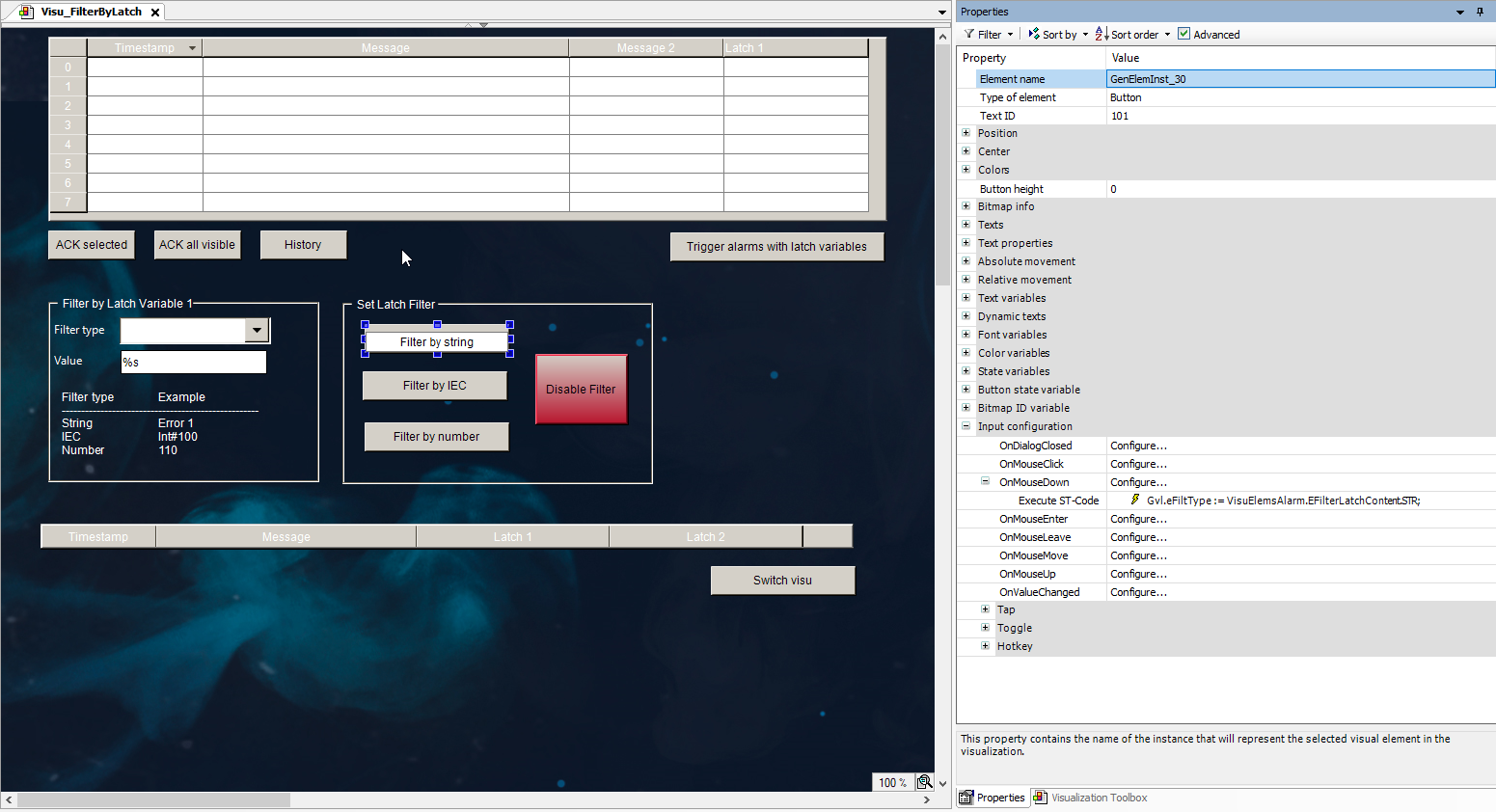
Configure the alarm table. In the visualization editor, select the element and configure its properties as follows:
The Alarm configuration property → Filter by latch1 → Filter variable is set to
GVL.sFilter.The Alarm configuration property → Filter by latch1 → Filter type is set to
GVL.eFiltType.The filtering is configured.