Monitoring and Detecting Errors
In online mode, the editor provides value monitoring and supports the writing and forcing of current values. You can set breakpoints, and the color-coded representation of the connections allows for a kind of flow control.
Monitoring
Important
The value of the connections is not read from the monitored variables, but calculated in the programming system. This is not a genuine flow control.
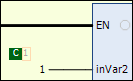
During online mode, the current value of each variable is displayed in the editor. Constant variables are given a green C symbol. The display of the values is defined in the Ladder editor (LD2) category of the CODESYS options.
Color-coded representation of connections:
In the online view of a ladder diagram, the connecting lines are color-coded: connections with the value TRUE are shown as a bold blue line, connections with the value FALSE as a bold black line. In contrast, connections with an unknown or analog value are shown normally (thin black line).
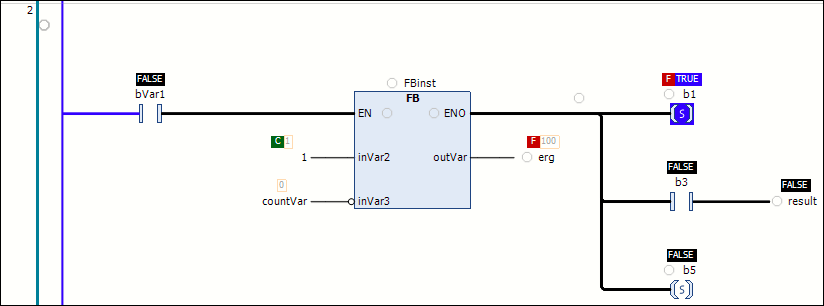
Breakpoint positions are also displayed in the ladder diagram.
Forcing
Writing and forcing of values
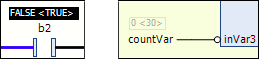
When a variable is currently forced, this is indicated directly before the forced value by the  symbol. If a value has been prepared for writing or forcing, then this value is displayed directly after the actual value in angled brackets
 <value>.
Variable with a forced value

Prepared value
Constant value
Breakpoint
Breakpoints are possible at these positions:
Where variable values can change, for example at an assignment
Where the program branches
Where another POU is called
At
ENinputs andENOoutputs of blocksAt networks in which a breakpoint is set. A breakpoint cannot be set on the entire network.
In the editor, possible breakpoint positions are indicated by an empty gray circle. Set breakpoints are displayed as a solid red circle.
Breakpoints in methods
CODESYS automatically sets a breakpoint in all methods which can be called. Therefore, when a method managed by an interface is called, breakpoints are set in all methods which occur in function blocks that implement this interface. Breakpoints are also set in all derived function blocks which use the method. When a method is called by a pointer to a function block, the breakpoints are set in the method of the function block and in all derived function blocks which use the method.